



-
 Twan van Beers
-
 15 March, 2017
As part of Group Policy Management guidelines from the Centre of Internet Security (CIS), the recommendation is to turn on Firewall logging on all Windows Servers, and to save each profile to their own log file.
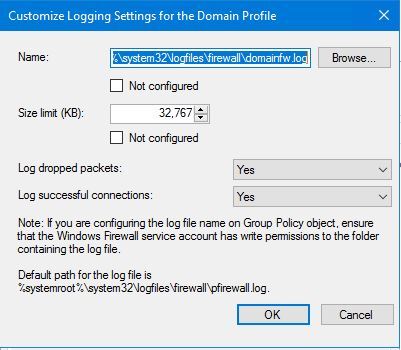
Configuring this in Group Policy is pretty straight forward. Just type in the new file name for each profile, set the size, ensure we log dropped and successful connections and away you go.
However… it seems that unless the log files have already been created the firewall service actually doesn’t log anything, nor does it log any errors!
After pulling my hair out for a few hours, not finding anything on Google is always a bad sign, I finally realised that when setting firewall log file names via GPO you have to manually create the log files! If you go into Windows Firewall on each server, go into each profile and click browse next to the file name, then the MMC nicely creates the file for you and sets the right permissions, but GPOs do not do this…
Per the comment below from Barnaby Arnott, a better way to solve this problem is to ensure that the parent folder exists and that the NT Service\mpssvc service account has Write permissions to that folder in order to be able to create the files itself
I created the following PowerShell function which will create a suitably permitted firewall logfile for you
Function New-FirewallLogFile { param ([string]$filename) New-Item $FileName -Type File -Force $Acl = Get-Acl $FileName $Acl.SetAccessRuleProtection( $True, $False ) $PermittedUsers = @( 'NT AUTHORITY\SYSTEM', 'BUILTIN\Administrators', 'BUILTIN\Network Configuration Operators', 'NT SERVICE\MpsSvc' ) foreach( $PermittedUser in $PermittedUsers ) { $Permission = $PermittedUser, 'FullControl', 'Allow' $AccessRule = New-Object System.Security.AccessControl.FileSystemAccessRule $Permission $Acl.AddAccessRule( $AccessRule ) } $Acl.SetOwner( (new-object System.Security.Principal.NTAccount( 'BUILTIN\Administrators' )) ) $Acl | Set-Acl $FileName }
Twan van Beers
Twan is a senior consultant with over 30 years of experience. He has a wide range of skills including Messaging, Active Directory, SQL, Networking and Firewalls. Twan loves to write scripts and get deep and dirty into debugging code, in order to understand and resolve the most complex of problems.
News & Insights
Trusted insights on technology and innovation to power your business growth.


-
 03/06/2026
A practical engineering guide to owners, assignment, consent, credentials and ...
Read More

-
19/05/2026
Domain migrations in Microsoft 365 are rarely as simple as shifting email ...
Read More

-
12/05/2026
Over the past 10 to 15 years, Microsoft 365 has fundamentally reshaped how ...
Read More

-
07/05/2026
Yesterday we had an all company meeting and I thought it would be cool to kick ...
Read More

-
07/05/2026
Planning a tenant-to-tenant migration? Talk to us
Read More

-
31/03/2026
In tenant-to-tenant (T2T) and Google-to-Microsoft 365 migration projects, ...
Read More

-
27/03/2026
You’d think this would be easy and not an uncommon request. There are genuine ...
Read More

-
23/03/2026
Managing Google to Microsoft Migration with GAM7 and PowerShell
Read More

-
16/03/2026
When a user leaves an organisation in Microsoft 365, administrators have ...
Read More
