



-
 Neil Langston
-
 07 July, 2020
Quick one today.
Recently a customer (Simon, thanks!) had a sudden disappearance of a number of vacant licenses which they were about to consume for other objects.
They wanted to investigate on which objects this occurred and who did it.
All of this can be found in the audit logs.
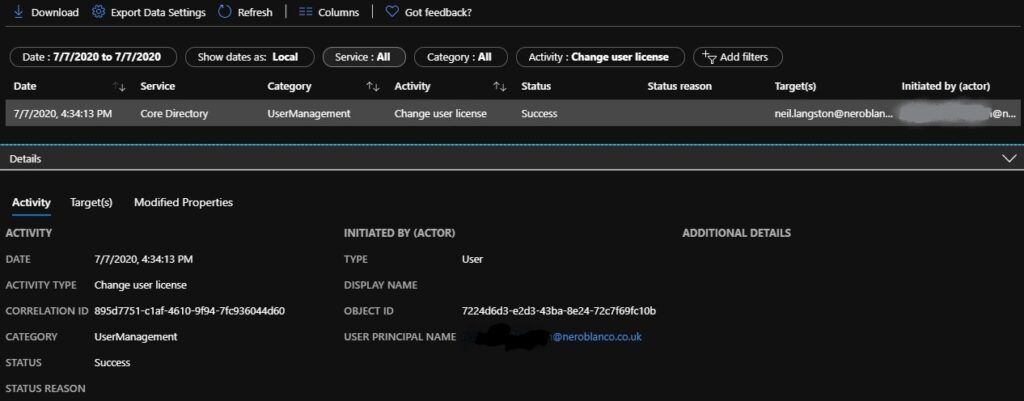
For example here is a date filter with the activity “Change user license”, you can drill into the targets (object which was changed) and actor (who performed the change).
However, if you have group licensing it might have a wider reach. You can obviously drill into what names were added into groups through the audit logs as well.
But, if you wanted to know via powershell what objects actually ended up changing, this would also help….
Get-AzureADUser -All $true |select UserPrincipalName -ExpandProperty AssignedPlans | Where-Object {$_.AssignedTimestamp -gt (get-date('2020-07-07 00:00:01'))} | select UserPrincipalName,AssignedTimestamp -Unique
Then you’d get a nice output of what has been updated

I did have some fun with the dates having to reverse how the search worked (dd/mm/yyyy with yyyy/mm/dd), sometimes you can’t see the wood through the trees, so Twan helped me out.

Neil Langston
News & Insights
Trusted insights on technology and innovation to power your business growth.


-
 03/06/2026
A practical engineering guide to owners, assignment, consent, credentials and ...
Read More

-
19/05/2026
Domain migrations in Microsoft 365 are rarely as simple as shifting email ...
Read More

-
12/05/2026
Over the past 10 to 15 years, Microsoft 365 has fundamentally reshaped how ...
Read More

-
07/05/2026
Yesterday we had an all company meeting and I thought it would be cool to kick ...
Read More

-
07/05/2026
Planning a tenant-to-tenant migration? Talk to us
Read More

-
31/03/2026
In tenant-to-tenant (T2T) and Google-to-Microsoft 365 migration projects, ...
Read More

-
27/03/2026
You’d think this would be easy and not an uncommon request. There are genuine ...
Read More

-
23/03/2026
Managing Google to Microsoft Migration with GAM7 and PowerShell
Read More

-
16/03/2026
When a user leaves an organisation in Microsoft 365, administrators have ...
Read More
