



-
 Conrad Murray
-
 13 May, 2020
We were asked to investigate an issue for a client today where the Whiteboard app wasn’t available to Teams users in a Teams meeting.
Here are the key requirements for enabling Whiteboard:
- Enable Whiteboard for tenant
- License the users
- Enable the Teams Policy
- Apply the Teams Policy to users
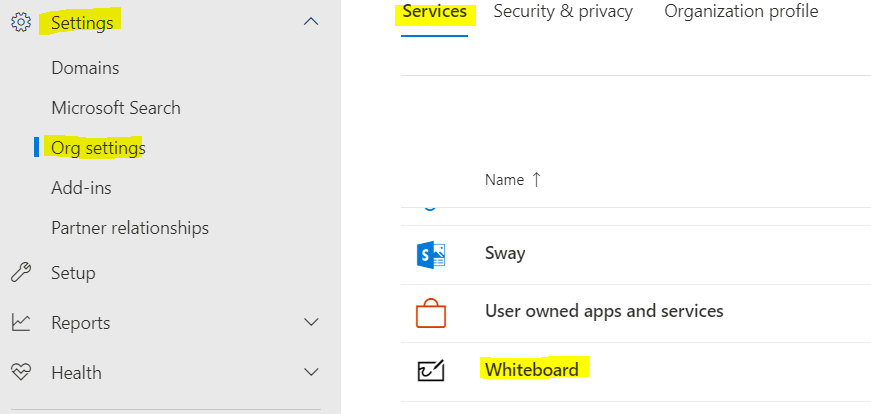
Enabled Whitebard for the tenant. Head on over to the Office 365 Admin Centre. Click on Settings\Org settings\Services
Turn on Whiteboard for everyone in your org
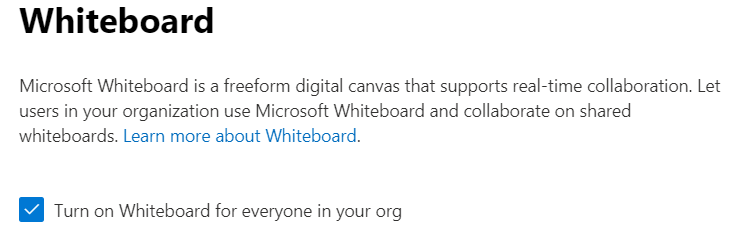
License your users. It is bundled in with the licenses like E3 and E5 so you may or may not have to enable it. Probably not by now.

Head over to the Teams admin portal and go to: Meetings\Meeting Policies\Global and Allow whiteboard
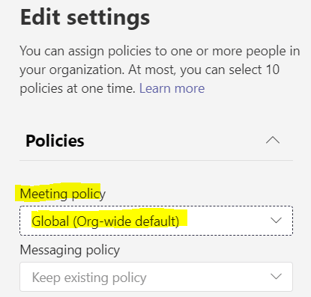
Now, you think you would be good to go? Maybe… As you have enabled it in the “Global (Org-wide default)” you need to check that is the policy that is actually applied to your users. Probably like us you have never changed those, neither had our client. They were all in fact assigned the “RestrictedAnonymousAccess” policy.
This policy does NOT have Whiteboard enabled.
I haven’t looked too much into this, but i suspect this is to do with the cross-over from Skype for Business to Teams and perhaps was to do with the Coexistence policy at some point. In fact that Policy shouldn’t really be used. When you run this command in PowerShell you see this:
Get-CsTeamsMeetingPolicy -Identity “Tag:RestrictedAnonymousAccess” | FL Identity, Description
Identity : Tag:RestrictedAnonymousAccess
Description : Do not assign. This policy is same as global defaults and would be deprecated
If you look at your users:
Get-CsOnlineUser [UPN] | FL TeamsMeetingPolicy
You can see what policy they have assigned. Blank (or $NULL) means “Global (Org-wide default)”. If you see “RestrictedAnonymousAccess” then you should update it.
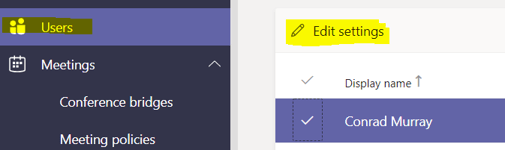
This is easy with: Get-CsOnlineUser [UPN] | Grant-CsTeamsMeetingPolicy -PolicyName $Null or via the GUI. You can in fact do it via bulk select:
Now what was interesting is that this question came to us pretty much the same that Microsoft sent out a “Message Center Major Change Update Notification” regarding csTeamsMeetingPolicy
csTeamsMeetingPolicy update to manage access to past meetings (MC211972)
We’re making some changes to settings within csTeamsMeetingPolicy.
Starting mid-June 2020, we’re changing the behavior of meeting policies which allows users to create and schedule meetings:
- AllowChannelMeetingScheduling
- AllowMeetNow
- AllowPrivateMeetNow
- AllowPrivateMeetingScheduling
This change will impact all the users who are assigned any of the above policies with the value set to “False”.
After this change, the past meetings created/organized by the users impacted will be expired. That means, no one will be able to join the meetings.
Correcting the policy applied to users resolves this as well.
https://docs.microsoft.com/en-us/powershell/module/skype/grant-csteamsmeetingpolicy?view=skype-ps
Connect to Skype for Business Online PowerShell
Import-Module SkypeOnlineConnector
$sfbSession = New-CsOnlineSession
Import-PSSession $sfbSession

Conrad Murray
Conrad Murray is a Microsoft Certified IT consultant working in IT for over 20 years specialising in the Messaging arena and in particular Office 365 and previously Microsoft Exchange On-Premises and IBM Domino. Working with like minded colleagues now delivering very large scale complex migrations from Office 365 to Office 365 (tenant to tenant), Lotus Notes and On-Premises Microsoft Exchange to Office 365.
News & Insights
Trusted insights on technology and innovation to power your business growth.


-
 03/06/2026
A practical engineering guide to owners, assignment, consent, credentials and ...
Read More

-
19/05/2026
Domain migrations in Microsoft 365 are rarely as simple as shifting email ...
Read More

-
12/05/2026
Over the past 10 to 15 years, Microsoft 365 has fundamentally reshaped how ...
Read More

-
07/05/2026
Yesterday we had an all company meeting and I thought it would be cool to kick ...
Read More

-
07/05/2026
Planning a tenant-to-tenant migration? Talk to us
Read More

-
31/03/2026
In tenant-to-tenant (T2T) and Google-to-Microsoft 365 migration projects, ...
Read More

-
27/03/2026
You’d think this would be easy and not an uncommon request. There are genuine ...
Read More

-
23/03/2026
Managing Google to Microsoft Migration with GAM7 and PowerShell
Read More

-
16/03/2026
When a user leaves an organisation in Microsoft 365, administrators have ...
Read More
