



-
 Conrad Murray
-
 03 April, 2020
This is a bit of a sledgehammer to crack a nut scenario to get you back up and running on teams. Where we have had to use this is for Tenant to Tenant migrations where the user and their workstation simply wont connect to the new tenant, and it is persistent to the legacy tenant. Also, every now and then we have had our own users just run into stuff that won’t resolve itself with a reboot simple uninstall / uninstall.
It’s most likely that like back in the old days just deleting the cache would do the trick, but belt & braces – go nuclear.
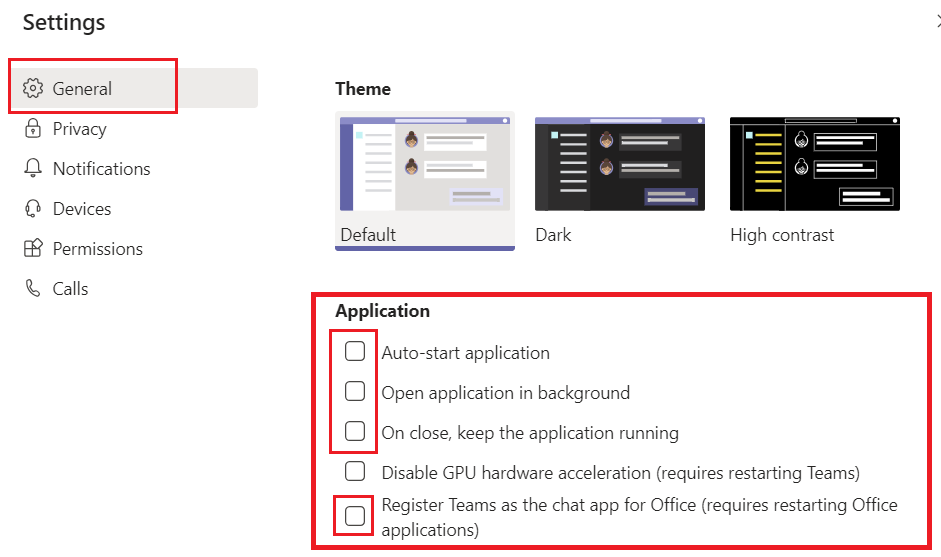
AutoStart Settings
Go to Teams and set it to not auto-start, nor open in background, or stay open when running and don’t have it set for chat app. Then exit the application by right click on the task bar and closing.
Once Teams is uninstalled, the cache files cleared and registry cleared, these should be moot.
Uninstall Teams
- Quit Teams by right-clicking the Teams icon in the taskbar and choosing Close window.
- In Windows, click on the Start button Start button > Settings > Apps
- Tip Windows Key + I takes you straight to settings
- Under Apps & features, search “Teams”.
- Highlight Microsoft Teams, then select Uninstall
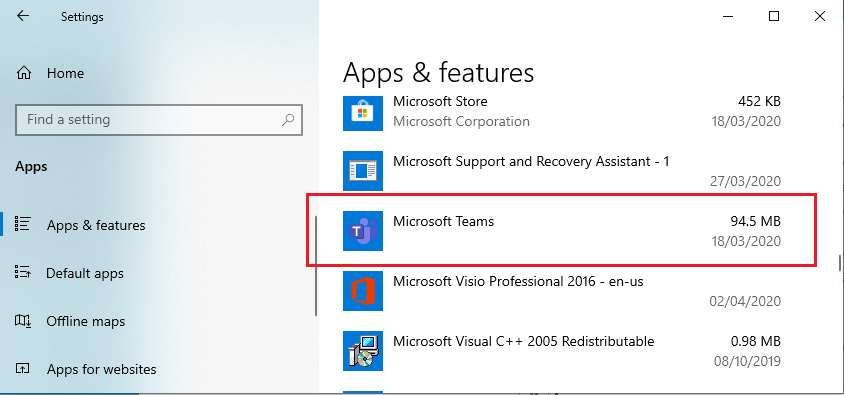
- A box will appear, then again select Uninstall to confirm. A new box will appear, asking Do you want to allow this app to make changes to your device? Select Yes.
Delete Cache and other files
Delete these files and folders: C:\Users\[Your Username]\AppData\Local\Microsoft
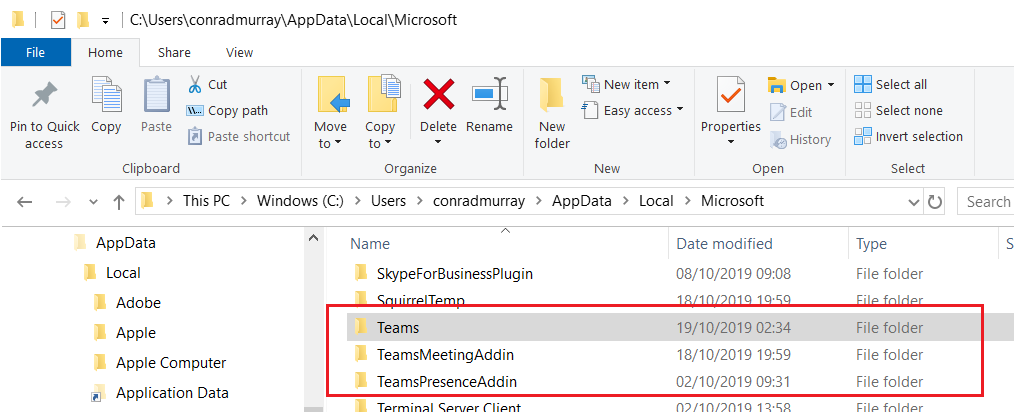 C:\Users\
[Your Username]\AppData\Local\Microsoft
C:\Users\
[Your Username]\AppData\Local\Microsoft
Delete these files and folders: C:\Users\[Your Username]\AppData\Roaming\Microsoft
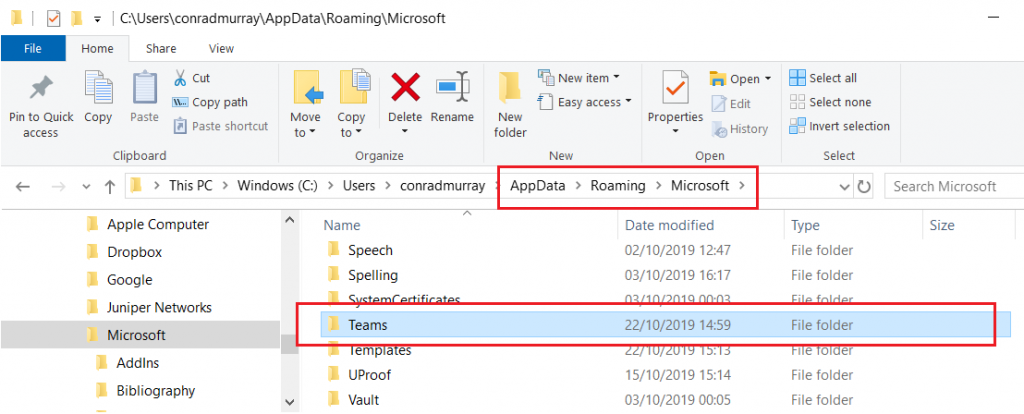 C:\Users\
[Your Username]\AppData\Roaming\Microsoft
C:\Users\
[Your Username]\AppData\Roaming\Microsoft
Delete these files: C:\Users\[Your Username]\AppData\Roaming
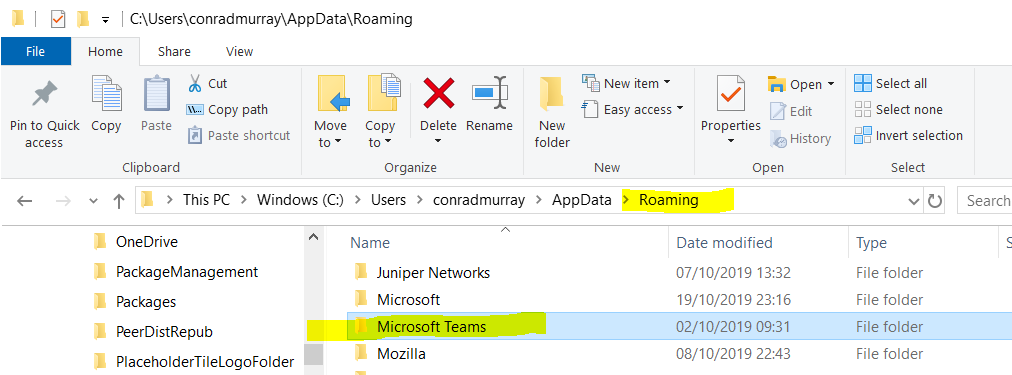 C:\Users\
[Your Username]\AppData\Roaming
C:\Users\
[Your Username]\AppData\Roaming
Or Remove via Add/Remove Programs
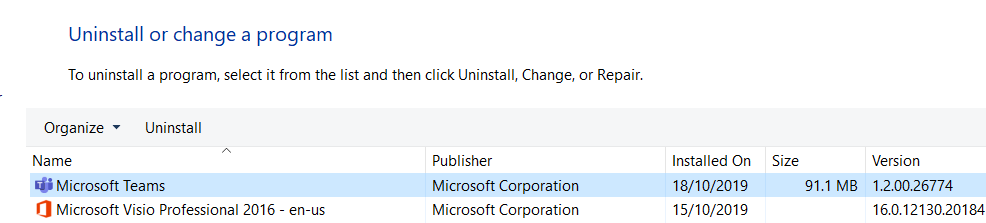
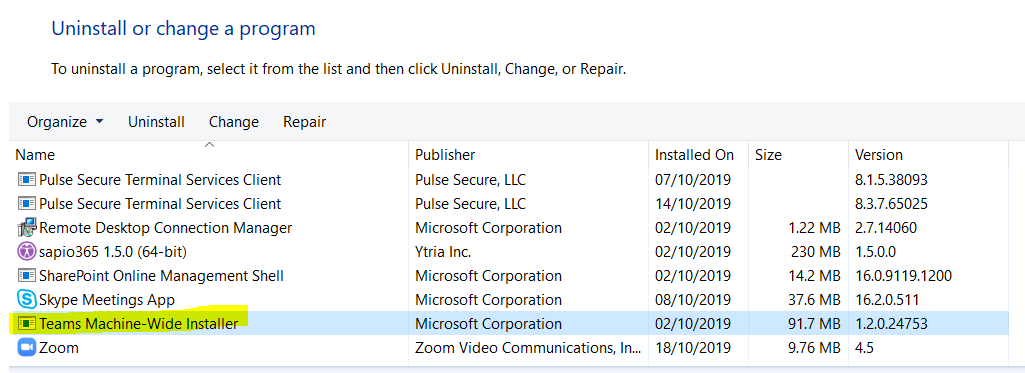
- Now select Teams Machine-Wide Installer, click Uninstall. Then follow the same process described to delete any remnant cache files per above
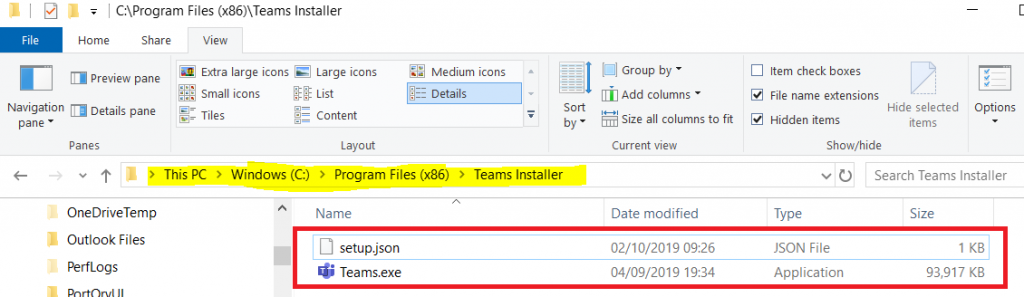
Delete Teams Installer
C:\Program Files (x86)\Teams Installer
Registry
Optional: Search the Registry and CAREFULLY evaluate and delete any residual keys for Teams or “Microsoft Teams”
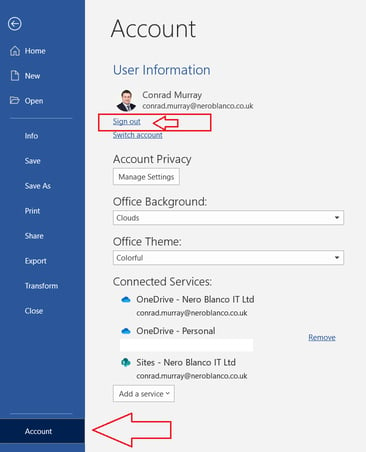
Log out of Microsoft Office completely
Go to Word to do this
File\Account
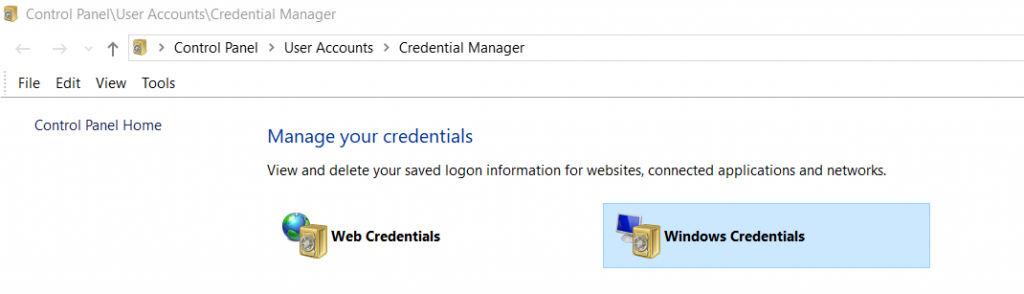
Clear Credentials
Control Panel\User Accounts\Credential Manager

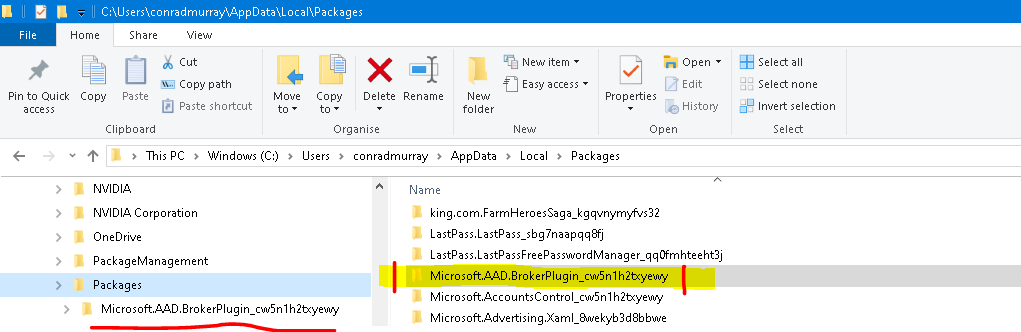
Rename the AAD BrokerPlugin
Navigate to:C:\Users\[your username]\AppData\Local\Packages. Find the folder called something like : Microsoft.AAD.BrokerPlugin_*****
e.g. Microsoft.AAD.BrokerPlugin_cw5n1h2txyewy
Right click and re-name of you can.
PowerShell Script to rename the AAD BrokerPlugin
# Rename the AAD BrokerPlugin directories to try to avoid TPM errors when using Office
$ProfilesDirectoryPath = (Get-ItemProperty -Path “registry::HKLM\Software\Microsoft\Windows NT\CurrentVersion\ProfileList” -Name ProfilesDirectory).ProfilesDirectory
$ProfileDirectories = Get-ChildItem -Path $ProfilesDirectoryPath -Directory
$UniqueRenameKey = ([guid]::newguid()).tostring().replace(‘-‘,”)
try{
$Renames = (Get-ItemProperty ‘registry::HKLM\SYSTEM\CurrentControlSet\Control\Session Manager’ -Name PendingFileRenameOperations -ErrorAction SilentlyContinue).PendingFileRenameOperations
if( $Renames ) {
$Renames = $Renames | ? { $_ -notlike ‘*Microsoft.AAD.BrokerPlugin_*’ }
}
} catch {
}
if( -not $Renames ) {
$Renames = @()
}
Foreach( $ProfileDirectory in $ProfileDirectories ) {
$AppDataPackagesPath = (‘{0}\AppData\Local\Packages’ -f $ProfileDirectory.FullName )
if( Test-Path $AppDataPackagesPath ) {
$MicrosoftAADBrokerPluginPackages = Get-ChildItem $AppDataPackagesPath -Directory -Filter ‘Microsoft.AAD.BrokerPlugin_*’
Foreach( $MicrosoftAADBrokerPluginPackage in $MicrosoftAADBrokerPluginPackages ) {
$Renames += (‘\??\{0}’ -f $MicrosoftAADBrokerPluginPackage.FullName)
$Renames += (‘\??\{0}_{1}’ -f $MicrosoftAADBrokerPluginPackage.FullName, $UniqueRenameKey)
}
}
$UserClassPath = (‘{0}\AppData\Local\Microsoft\Windows\UsrClass.dat’ -f $ProfileDirectory.FullName )
if( Test-Path $UserClassPath ) {
$Renames += (‘\??\{0}’ -f $UserClassPath)
$Renames += (‘\??\{0}_{1}’ -f $UserClassPath, $UniqueRenameKey)
}
}
if( $Renames ) {
try{
$DontSave = Get-ItemProperty ‘registry::HKLM\SYSTEM\CurrentControlSet\Control\Session Manager’ -Name PendingFileRenameOperations -ErrorAction SilentlyContinue
Set-ItemProperty ‘registry::HKLM\SYSTEM\CurrentControlSet\Control\Session Manager’ -Name PendingFileRenameOperations -Value $Renames
} catch {
New-ItemProperty ‘registry::HKLM\SYSTEM\CurrentControlSet\Control\Session Manager’ -Name PendingFileRenameOperations -Value $Renames -PropertyType MultiString | Out-Null
}
}
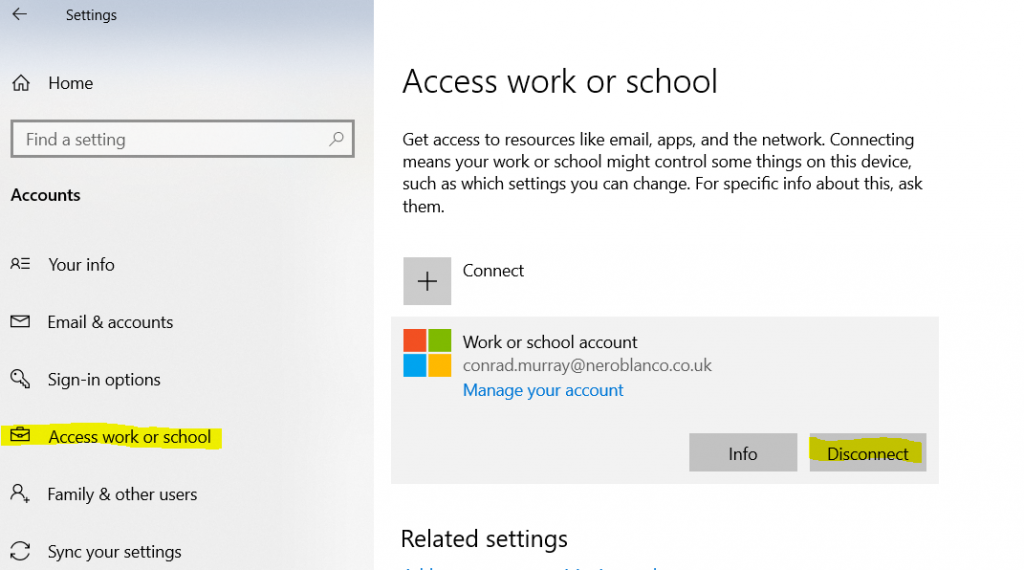
Remove User from Access Work & School
You may not want to do this if re-enrolling your device isn’t always a straightforward exercise like you have to be connected to the VPN or have Admin rights to re-enroll it. You may not even be able to unenroll it, so maybe just try a reboot here first before moving to these next steps.
REBOOT
Does Teams automatically reinstall?
No? Good
Reinstall Teams
Go to https://products.office.com/en-gb/microsoft-teams/download-app download and reinstall, or go to https://teams.microsoft.com log in and re-install
Apple Mac
Teams Login Issues Mac OS X –
Keychain Access:
Delete the entry called Microsoft Teams Identities Cache
Delete Cache files in these folders:
~/Library/Application Support/Microsoft/Teams/Cache”
~/Library/Application Support/Microsoft/Teams/Application Cache/Cache”
You might need to run this too: How to remove Office license files on a Mac

Conrad Murray
Conrad Murray is a Microsoft Certified IT consultant working in IT for over 20 years specialising in the Messaging arena and in particular Office 365 and previously Microsoft Exchange On-Premises and IBM Domino. Working with like minded colleagues now delivering very large scale complex migrations from Office 365 to Office 365 (tenant to tenant), Lotus Notes and On-Premises Microsoft Exchange to Office 365.
News & Insights
Trusted insights on technology and innovation to power your business growth.


-
 03/06/2026
A practical engineering guide to owners, assignment, consent, credentials and ...
Read More

-
19/05/2026
Domain migrations in Microsoft 365 are rarely as simple as shifting email ...
Read More

-
12/05/2026
Over the past 10 to 15 years, Microsoft 365 has fundamentally reshaped how ...
Read More

-
07/05/2026
Yesterday we had an all company meeting and I thought it would be cool to kick ...
Read More

-
07/05/2026
Planning a tenant-to-tenant migration? Talk to us
Read More

-
31/03/2026
In tenant-to-tenant (T2T) and Google-to-Microsoft 365 migration projects, ...
Read More

-
27/03/2026
You’d think this would be easy and not an uncommon request. There are genuine ...
Read More

-
23/03/2026
Managing Google to Microsoft Migration with GAM7 and PowerShell
Read More

-
16/03/2026
When a user leaves an organisation in Microsoft 365, administrators have ...
Read More
