



-
 Neil Langston
-
 15 November, 2017
An interesting challenge was discovered at a client recently during testing in a development (pre prod) environment. Whilst we were not the architects of the directory synchronisation, it serves for a great blog/article.
A very very large customer (300k users) is deploying some additional Exchange forests for their final countries to migrate to Outlook from Lotus Notes. The vast majority of the users in this organisation are in a central, global Exchange forest (G), but for some very complicated management and trust reasons another set of forests (A, B, C, ++) need to be deployed for those countries. All Exchange 2013 as this project started many moons ago.
Originally the plan was simple, sync all the LeDNs from the global forest (G) into the representative contact objects in the smaller forests (A, B, C), but not visa versa to avoid bloat and very complex directory synchronisation between all the forests because of the organisations size. This is what created the challenge.
An important note: calendaring behaves differently to mail when it comes to the use of LeDNs.
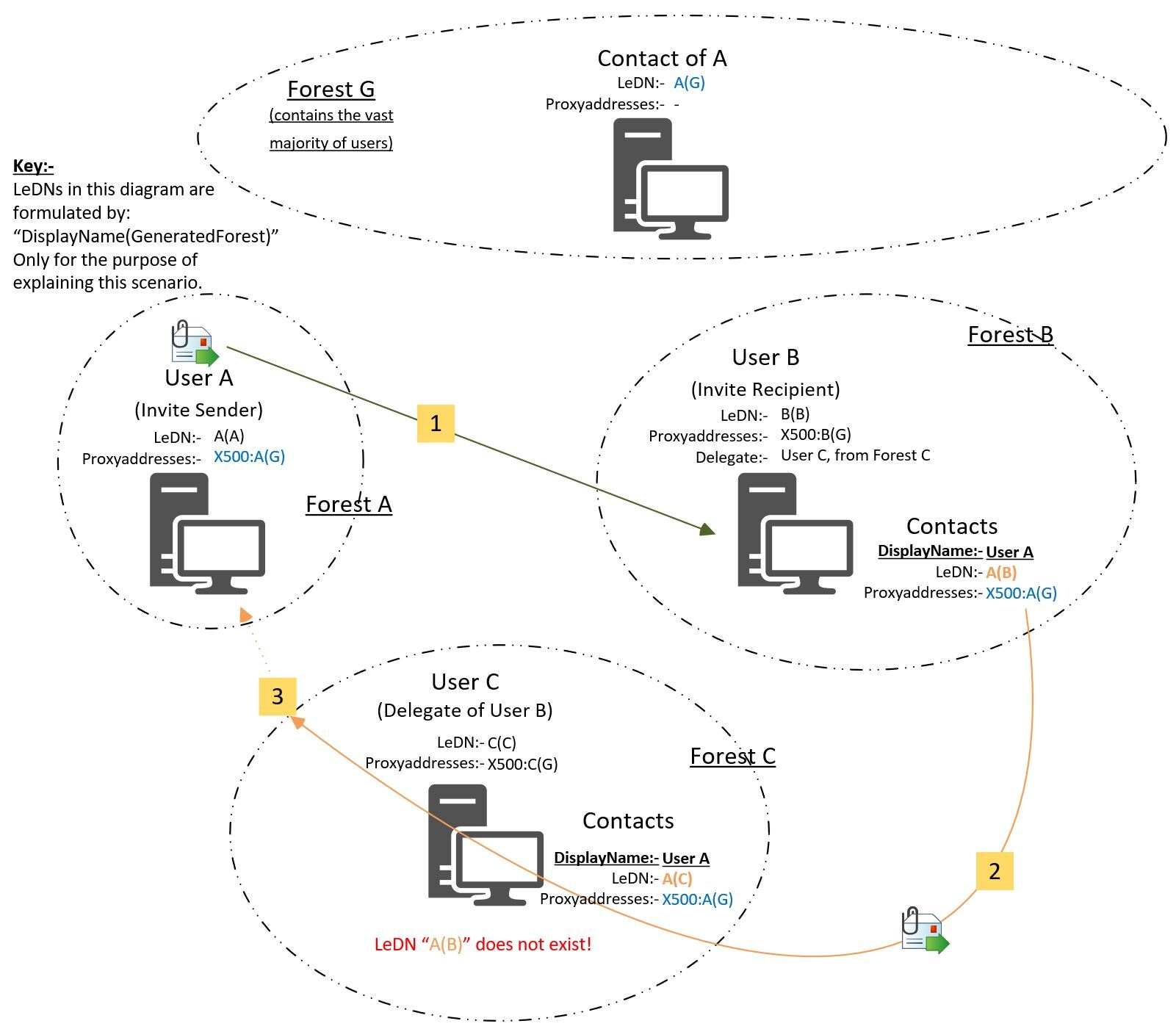
Here is the scenario which creates an NDR….
- Forest G has its LeDNs added to corresponding user/contact (A, B, C) objects in their Forests A, B C, no other LeDN sync is performed
- (yellow tag 1 on the diagram) Forest/User A sends invite to Forest/User B
- Forest/User C responds on behalf of Recipient in Forest B (User in Forest B has an EA in Forest C). User C has added user B as an “additional mailbox” rather than “additional account” method in Outlook (in this example). This means that messages are sent using User’s C forest.
- (yellow tag 2 on the diagram) When User C replies, they are using the LeDN from User A’s representation/contact in Forest B.
- (yellow tag 3 on the diagram) This does not work when sending the message from Forest C. (as the LeDN from Forest B or even A, does not exist in Forest C)
Solution:- Therefore all users/shared-mail objects in all forests need to have their LeDNs synced to all other corresponding objects (as X500’s) everywhere to allow this scenario to work when you are delegating mail across forests like this.
This particular case would only require User A’s LeDN to be synced, but then if the reverse were to happen (B sends to A), you start to require all users.
So the LeDN of all contacts/MEUs needs to synced everywhere. (The LeDN of User A in Forest A needs to be an X500 in the proxyaddresses on their contact/MEU object in Forest B, C & G, and visa versa). The more prevalent situation here is cross forest delegation of team accounts or shared mail databases where the pain is most apparent, especially when access is granted through security group membership as it would be harder to identify which objects would need full sync if selective sync were possible.
As a side note, granting direct Full Access on the object would make life easier and negate this complex sync, but that was not viable in this organisation.
On the other hand, it does make the migration of email calendar data slightly more simple, as now we do not need to build our translation tables (Mapping Notes Names to Exchange LeDNs) for calendaring based on LeDNs in the regional Exchange forests, we can use the central forest (G) LeDNs for the migrations farm wide.

Neil Langston
News & Insights
Trusted insights on technology and innovation to power your business growth.


-
 03/06/2026
A practical engineering guide to owners, assignment, consent, credentials and ...
Read More

-
19/05/2026
Domain migrations in Microsoft 365 are rarely as simple as shifting email ...
Read More

-
12/05/2026
Over the past 10 to 15 years, Microsoft 365 has fundamentally reshaped how ...
Read More

-
07/05/2026
Yesterday we had an all company meeting and I thought it would be cool to kick ...
Read More

-
07/05/2026
Planning a tenant-to-tenant migration? Talk to us
Read More

-
31/03/2026
In tenant-to-tenant (T2T) and Google-to-Microsoft 365 migration projects, ...
Read More

-
27/03/2026
You’d think this would be easy and not an uncommon request. There are genuine ...
Read More

-
23/03/2026
Managing Google to Microsoft Migration with GAM7 and PowerShell
Read More

-
16/03/2026
When a user leaves an organisation in Microsoft 365, administrators have ...
Read More
