




-
 Twan van Beers
-
 29 May, 2015
Before we look at sending TLS mail to Exchange, let’s talk about using a command line to send mail without TLS.
The command you use to send plain email to Exchange is the telnet client. It is no longer installed by default but you can install it by adding the Windows Feature for telnet client. Once it is installed then you can use the following command
telnet serverfqdn 25
Exchange SMTP TELNET
The first thing you need to run after you connect is EHLO or HELO to tell Exchange who you are. Although Exchange doesn’t really care about what name you give it, the normal name to give is your Fully Qualified Domain Name.
EHLO mypc.me.com
Exchange SMTP EHLO
What you do next depends on the options that Exchange has given you. There should be one option that starts with 250-AUTH, now if it says LOGIN after that then you can use basic authentication, whereas if it says NTLM then Exchange expects NTLM authentication. You can also try to send mail without performing any login, although usually Exchange will reject this unless your source IP address happens to be trusted for anonymous mail delivery.
Assuming that Exchange contains LOGIN on the 250-AUTH line then let’s perform a basic authentication login. Please NOTE that we are NOT using TLS and therefore these credentials could be intercepted on the network. Exchange expects the username and password to be Base64 encoded, this is to ensure that any special characters won’t interfere with the command syntax. In order to Base64 encode a phrase you can go to http://www.webpan.com/Customers/Email/base64_conversion.htm
AUTH LOGIN <type the base64 for your domain\username> <type the base64 for your password>
Exchange SMTP AUTH
If all has gone to plan then Exchange should now say 235 2.7.0 Authentication successful. Right so we’re now ready to actually send the email!
First you need a from address, you need to have rights to send from this address, or Exchange needs to be configured to trust you to send as any sender.
MAIL FROM:someone@somewhere.com
Exchange SMTP MAIL
Next you need one or more recipients, the people who will actually get this email. Exchange needs to know about these recipients or needs to be configured to allow you to relay to any recipient.
RCPT TO:someoneelse@somewhere.com
Exchange SMTP RCPT
That’s the message envelope sorted, now for the actual email
DATAWe’re now ready to type the email itself, this can be just the message body as well as any other headers including
- Date:
- From:
- To:
- Reply-To:
- CC:
- BCC:
- Subject:
If you want to send headers and a message body then type the headers one line at a time first, then a blank line before starting the message body. At the end of the email enter a . on a line by itself and Exchange will process the message. If all is well then you’ll get a response code 250 2.6.0 Queued mail for delivery

Exchange SMTP DATA

Exchange SMTP QUIT
Right so you may now think, ok well there are loads of tutorials about how to send telnet mail, but if I type STARTTLS after the EHLO then I can’t ever get any further… That’s true however I wanted to give a quick summary of how you use the basic SMTP commands. You can use all of the above with TLS mail too, the trick is to not use telnet but openssl to first create the connection. You can download openssl from www.openssl.org
To use openssl to start a TLS connection use the following command
openssl s_client -connect serverfqdn:25 -starttls smtp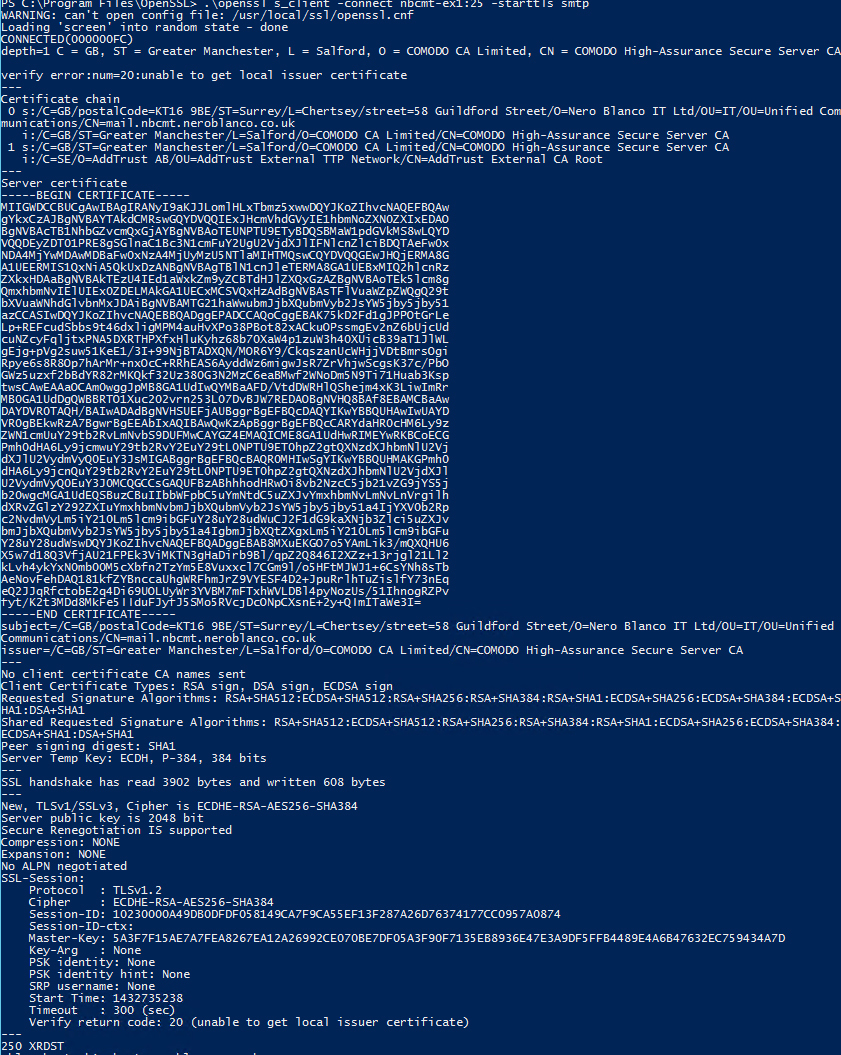
Exchange SMTP TLS
Now you can further add switches like -ssl3 -tls1 -tls1_1 -tls1_2 in order to force openssl to use a specific encryption protocol, so it is great for checking if your server is protected from vulnerabilities like POODLE and BEAST, etc.
Anyway, I hope that is useful to people. Have fun!

Twan van Beers
Twan is a senior consultant with over 30 years of experience. He has a wide range of skills including Messaging, Active Directory, SQL, Networking and Firewalls. Twan loves to write scripts and get deep and dirty into debugging code, in order to understand and resolve the most complex of problems.
News & Insights
Trusted insights on technology and innovation to power your business growth.


-
 03/06/2026
A practical engineering guide to owners, assignment, consent, credentials and ...
Read More

-
19/05/2026
Domain migrations in Microsoft 365 are rarely as simple as shifting email ...
Read More

-
12/05/2026
Over the past 10 to 15 years, Microsoft 365 has fundamentally reshaped how ...
Read More

-
07/05/2026
Yesterday we had an all company meeting and I thought it would be cool to kick ...
Read More

-
07/05/2026
Planning a tenant-to-tenant migration? Talk to us
Read More

-
31/03/2026
In tenant-to-tenant (T2T) and Google-to-Microsoft 365 migration projects, ...
Read More

-
27/03/2026
You’d think this would be easy and not an uncommon request. There are genuine ...
Read More

-
23/03/2026
Managing Google to Microsoft Migration with GAM7 and PowerShell
Read More

-
16/03/2026
When a user leaves an organisation in Microsoft 365, administrators have ...
Read More
