



-
 Twan van Beers
-
 28 March, 2019
We hear about identity theft and protection all the time in IT. For Office 365 there are number of things you can do to help protect your organisation
The flagship approach from Microsoft is Microsoft 365, which is a suite of products that together work in harmony. However harmony and simplicity does cost…
Microsoft 365 comes in three flavours. Business, enterprise E3 and enterprise E5. If you like the features but can’t afford them then there are more cut down combinations that we can talk you through. We would suggest at least the following individual appropriately configured SKUs
- Office 365 ATP
- Azure AD premium plan 1
What if you are really cash strapped…? There are still some great options for you
- Always use a separate account for administration
- Enable the default MFA rule for administrators
- Use a different password on Office 365 than elsewhere
- Use windows 10
- Use windows hello for business
- Use the Office suite on every device
- Disable authenticated SMTP
- Add known bad sites into Restricted Sites/DNS/PAC
- Use Edge Application Guard
Always use a separate account for administration
We do still see many customer who use their regular Office 365 account for administration. A better approach is to use a second account solely for administration. There are some things that need a licence though, in particular managing Teams and SharePoint does require a licence.
Enable the default MFA rule for administrators
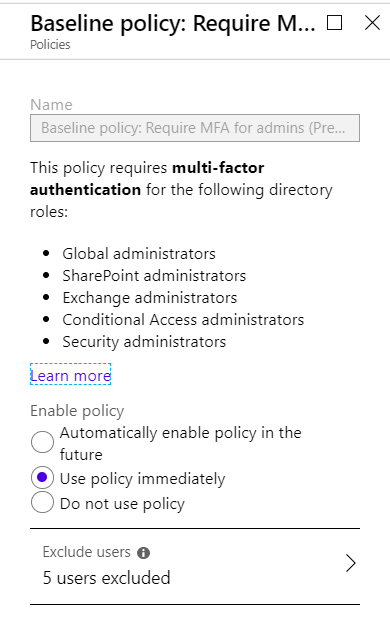
Microsoft has added a default rule to require Multi-Factor Authentication for all administrators when using the web consoles. This adds an extra barrier to make it harder for those accounts to be misused.
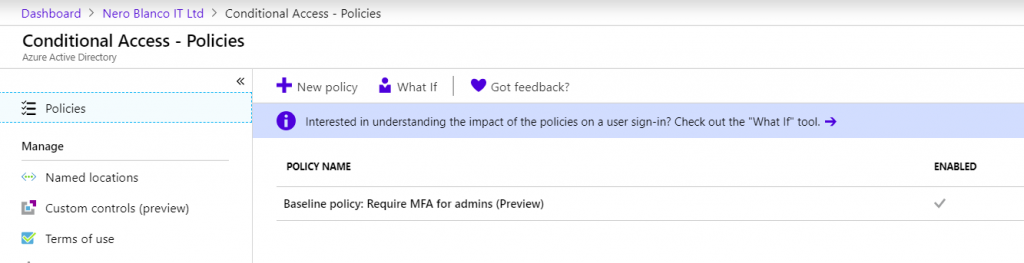
Go to https://portal.azure.com, log in with your administrative account (everyone who has Office 365 has access to the Azure portal too). Once you’re in the portal then go to Azure Active Directory and within that Conditional Access
Conditional Access Rules
Click on “Baseline policy: Require MFA for admins” and ensure that the rule is set to Use policy immediately. If you have applications or services that require non MFA enabled accounts then they can be explicitly added as exceptions to this rule
Use a different password on Office 365 than elsewhere
Most people don’t use a password manager like LastPass or KeyPass, and as a result the temptation is to try to use the same password everywhere. This makes it easy for you, but unfortunately also makes it easy for the account to be hacked in one place and then used everywhere else.
Ideally you should use a password manager so that you can have a different password everywhere, but even without that it is worth ensuring that your Office 365 administrative account’s password is different to anything else.
Use windows 10
Windows 10 is the most secure Windows Operating System… I’m sure you’ve heard this before but it is actually true. If properly configured then Windows 10 is a great OS. You definitely want to make sure you stay up to date with patching (although admitting that Microsoft’s recent spate of issues may have left some a little gun shy)
Use Windows Hello for Business
Windows Hello for Business can be a bit tricky to get configured, but it allows you to use a PIN or biometric data to gain access to resources. This PIN and biometric data is only stored on the devices that you configured it on, making it very hard for someone to compromise your account unless they have your device. Most of the time brute force attacks are thwarted by the devices themselves, making this a big jump in securing your identity
Use the Office suite on every device
Office is available on pretty much any device, including iOS, Mac, Android and Windows. It gives a good consistent experience on all of those and assuming again that you keep this patched (The number one reason people are hacked is lack of patching) it is pretty secure.
Disable authenticated SMTP
Office 365 has many different ways of connecting to it, and one particular way is rarely used legitimately but is a massive honeypot for hackers. Authenticated SMTP (which also allows IMAP/POP to work with basic authentication) is on by default.
We advise every Office 365 client to turn off Authenticated SMTP at the tenant level and then enable it for specific accounts if absolutely needed (and ideally then adding in Conditional Access rules so that account can only be used from certain locations, etc)
Set-TransportConfig -SmtpClientAuthenticationDisabled $TrueThen if you need to enable it for a user then you can use the following to enable it just for them
Set-CASMailbox 'emailaddress' -SmtpClientAuthenticationDisabled $FalseAdd known bad sites into Restricted Sites/DNS/PAC
There are some website names or Top Level Domains that are more likely to be suspect, e.g. .host, .cc, tk If you’re really concerned about security then on your Windows machine you have options to use things like Restricted Sites in IE (which unfortunately doesn’t let you put in entire top level domains) or a PAC file, similarly if you have an on-premises Active Directory then you can use DNS to create additional DNS zones with no records in them for any website name or top level domain that you want to prevent anyone from accessing. You could even go the other way around only allow access to sites or top level domains that you actually trust.
Both of these approaches are a lot of work to maintain though, so they’re not for the fainthearted.
In summary, protecting your identity is of upmost importance. This protection does come at a cost but there are things you can do even if you don’t want to pay more for them
Get in touch if you’d like to discuss this in more detail or you’d like our assistance in keeping you and your company safe

Twan van Beers
Twan is a senior consultant with over 30 years of experience. He has a wide range of skills including Messaging, Active Directory, SQL, Networking and Firewalls. Twan loves to write scripts and get deep and dirty into debugging code, in order to understand and resolve the most complex of problems.
News & Insights
Trusted insights on technology and innovation to power your business growth.


-
 03/06/2026
A practical engineering guide to owners, assignment, consent, credentials and ...
Read More

-
19/05/2026
Domain migrations in Microsoft 365 are rarely as simple as shifting email ...
Read More

-
12/05/2026
Over the past 10 to 15 years, Microsoft 365 has fundamentally reshaped how ...
Read More

-
07/05/2026
Yesterday we had an all company meeting and I thought it would be cool to kick ...
Read More

-
07/05/2026
Planning a tenant-to-tenant migration? Talk to us
Read More

-
31/03/2026
In tenant-to-tenant (T2T) and Google-to-Microsoft 365 migration projects, ...
Read More

-
27/03/2026
You’d think this would be easy and not an uncommon request. There are genuine ...
Read More

-
23/03/2026
Managing Google to Microsoft Migration with GAM7 and PowerShell
Read More

-
16/03/2026
When a user leaves an organisation in Microsoft 365, administrators have ...
Read More
