



-
 Conrad Murray
-
 13 February, 2024
Recently we received a support request from a client regarding Outlook Rules for a shared mailbox not running automatically – but they would run manually by the end users. The had been running successfully up until now without issue. Being an Exchange Admin and Outlook specialist, I figured I would get this resolved in no time. Well it turned out to be a bit trickier than we had anticipated.
My first suspicion was that it was related to the total number of enabled rules exceeding the Rules Quota. A quick check showed there were 49 rules and the RulesQuota was 65 KB
(Get-InboxRule -Mailbox mailbox@contoso.com).count
Get-Mailbox mailbox@contoso.com | FL RulesQuota
So I raised it to 256 KB with Set-Mailbox -RulesQuota “256 KB”
This did not resolve the issue so I moved to looking at the actual Rules in Outlook. This served two purposes, I could create a brand new Outlook Profile and look at the Rules. It was unlikely a new Outlook profile would make any difference, and it did not.
Looking at each rule I was looking for any oddities like run “on this computer only”, or “stop processing more rules” and any that were moving to folder where the target folder did not exist. A spot check showed they all looked pretty normal.
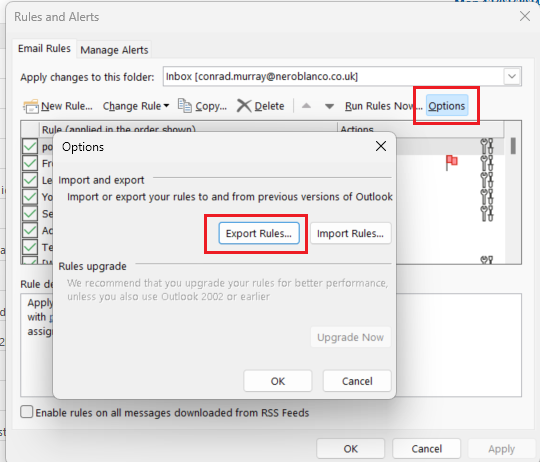
Then we moved to exporting all the Rules, deleting them and re-importing them.
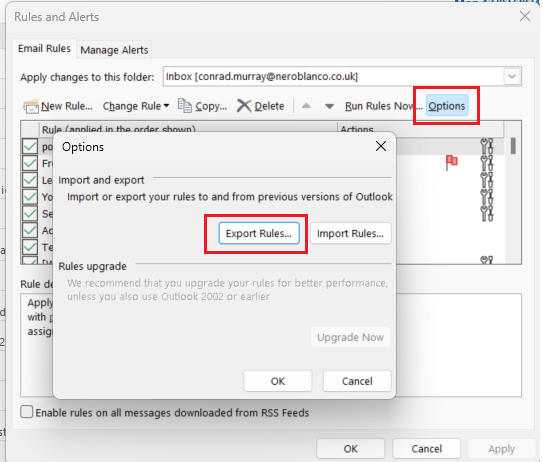
This did not work. So I created a brand new Rule and checked if that would run automatically. It did not, but it did run manually like all the others.
I switched to OWA to check the Rules, they all looked identical Server based Rules, but I created new one anyway – again it did not run atumatically.
I decided to pull in a colleague for peer review and together we worked through it all again. We checked the Mailbox Quota, whilst the mailbox was large, it was only around 80% of quota.
Working through a bit more we had an inkling about Journalling issues and limitations and sure enough when we looked at the TransportConfig we could see this mailbox was being used as the JournallingReportNdrTo mailbox.
Get-TransportConfig | FL JournalingReportNdrTo
So we created a new Shared Mailbox and ran:
Set-TransportConfig -JournalingReportNdrTo ClientJournalingReportNdrTo@contoso.com
And voila! The Mailbox Rules strated working again.
Here is the technical link to why this break Rules:
Transport and mailbox rules in Exchange Online or on-premises Exchange Server don’t work as expected
We checked with the client when and how that attribute had been updated and there was a simple explanation. They advised us that they had deployed a tool that required Journalling and that tool had updated the TransportConfig attribute during the deployment when the client was required to provide a Mailbox value. Technically speaking, this value should NOT be a Microsoft 365 Exchange Online Mailbox but as it is used only used when the Journaling mailbox is not available it was ok.

Conrad Murray
Conrad Murray is a Microsoft Certified IT consultant working in IT for over 20 years specialising in the Messaging arena and in particular Office 365 and previously Microsoft Exchange On-Premises and IBM Domino. Working with like minded colleagues now delivering very large scale complex migrations from Office 365 to Office 365 (tenant to tenant), Lotus Notes and On-Premises Microsoft Exchange to Office 365.
News & Insights
Trusted insights on technology and innovation to power your business growth.


-
 03/06/2026
A practical engineering guide to owners, assignment, consent, credentials and ...
Read More

-
19/05/2026
Domain migrations in Microsoft 365 are rarely as simple as shifting email ...
Read More

-
12/05/2026
Over the past 10 to 15 years, Microsoft 365 has fundamentally reshaped how ...
Read More

-
07/05/2026
Yesterday we had an all company meeting and I thought it would be cool to kick ...
Read More

-
07/05/2026
Planning a tenant-to-tenant migration? Talk to us
Read More

-
31/03/2026
In tenant-to-tenant (T2T) and Google-to-Microsoft 365 migration projects, ...
Read More

-
27/03/2026
You’d think this would be easy and not an uncommon request. There are genuine ...
Read More

-
23/03/2026
Managing Google to Microsoft Migration with GAM7 and PowerShell
Read More

-
16/03/2026
When a user leaves an organisation in Microsoft 365, administrators have ...
Read More
