



-
 Twan van Beers
-
 20 September, 2017
Microsoft recently released a new subscription called Microsoft 365. It is available in Business, Enterprise E3 and Enterprise E5 variants. The Microsoft 365 Business is effectively Office 365 Business Premium, EMS (simplified for Business) and Windows 10. The Enterprise variants add more configurable options and deeper insight.
So why would you want to buy a bundle like this? Of course ease of subscribing/licensing is one, as in you have one SKU assigned to each person and they get a full suite of tools from OS to productivity. The biggest reason though is security. Windows 10 in itself is the ‘most secure Windows operating system ever’
So what are the security features that you get with a Microsoft 365 stack?
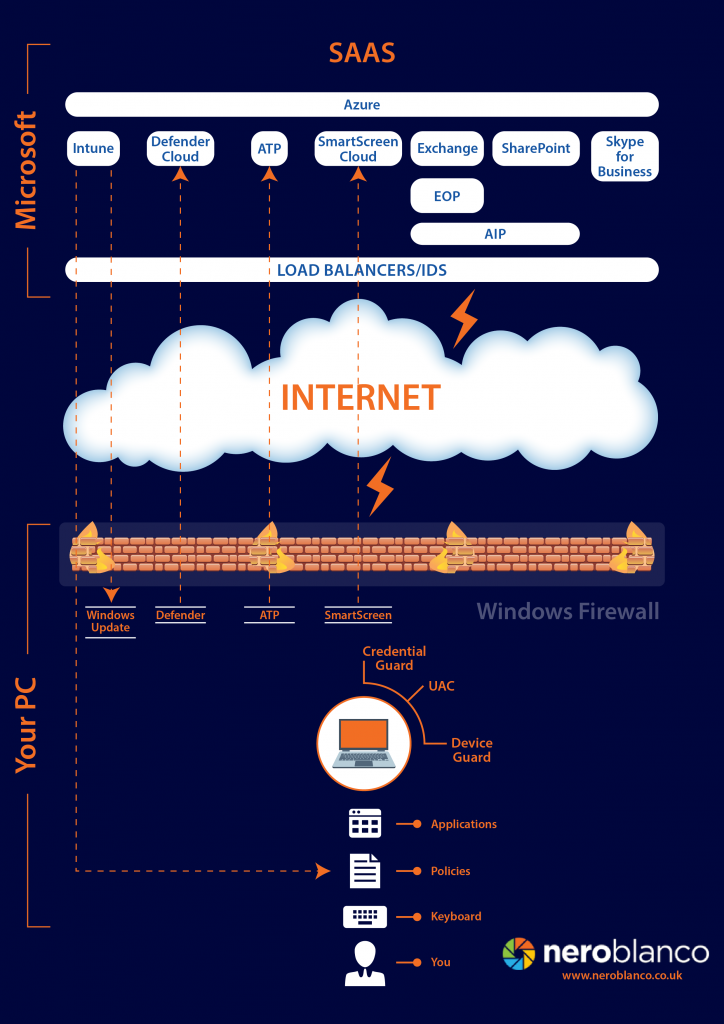
Microsoft 365
User Account Control
- User Account Control has been with us for a long time and often gets switched off. With Windows 10 it doesn’t appear to be as intrusive and it does mean that any action that requires administrative consent needs to be explicitly granted
Windows Defender
- Windows 10 contains Windows Defender and one of the best security features is Block on First Sight. This uses file signatures to check if a file has ever been scanned before on any Windows Defender machine in the world. If it has and it was deemed malware then it won’t allow this file to be opened. If a file has never been scanned then it will send a copy of the file to Microsoft for detonation (i.e. run and inspect the outcome) A decision will then be made if the file is deemed safe or not, if it is not safe then again it won’t run. This allows Windows Defender to react in near real-time to outbreaks and prevent them.
SmartScreen
- IE and Edge contain SmartScreen which will send URLs to Microsoft to get a safe/not safe answer back, and will allow or disallow access based on that decision
Credential Guard
- The Windows 10 Enterprise SKU adds virtualization techniques to ensure that passwords that are normally held in memory are secured from prying eyes, so that even someone with administrative or system level access cannot read the credentials within the OS.
Device Guard
- Device Guard is all about ensuring that you can only run trusted applications and you have control over what you do or don’t trust.
Intune
- Intune is used for Mobile Device Management (where a Mobile Device is pretty much any device running Windows 10, iOS or Android) You use Intune to push policies to devices to determine what device features are allowed to be used, which security measures must be in place, etc. You can also use Intune to publish application to these mobile devices, and most importantly you can selectively wipe the corporate data off devices that are used to access your company data.
Conditional Access
- Conditional Access leverages Intune and Azure AD to ensure that only devices you know and trust are allowed to access your data. Devices can be trusted because they join your Azure AD, are registered within Azure AD or are enrolled into Intune. So you know that the device that is used has a level of security that you are happy with
Azure Information Protection
- Azure Information Protection is all about encrypting data and ensuring you can grant granular access to the information. It generally only works for PDF files and Office documents, but that often covers a large part of the more sensitive data. e.g. you can send a Word Document and specify that only a certain set of people can open the document but even then they cannot copy or print it. This is similar to Rights Management Services that are available on premises
Advanced Threat Protection
- Advanced Threat Protection is a post-breach tool to let you know what happened and how far reaching the attack was. It also shows you attacks that were stopped, but generally those are not as interesting as the ones that were not stopped
Together all of the above adds up to a pretty secure stack for accessing corporate data. Of course there are third party products which may add more security over and above the base level shown here, but it is a start. The Creators Fall release will further strengthen Windows 10 security by adding things like Application Guard to virtualise applications running in Edge to a minimal virtual machine with no way of accessing other data or applications. Microsoft are taking security very serious these days and I have no doubt that every Windows 10 release going forward will be their ‘most secure Windows operating system ever’

Twan van Beers
Twan is a senior consultant with over 30 years of experience. He has a wide range of skills including Messaging, Active Directory, SQL, Networking and Firewalls. Twan loves to write scripts and get deep and dirty into debugging code, in order to understand and resolve the most complex of problems.
News & Insights
Trusted insights on technology and innovation to power your business growth.


-
 03/06/2026
A practical engineering guide to owners, assignment, consent, credentials and ...
Read More

-
19/05/2026
Domain migrations in Microsoft 365 are rarely as simple as shifting email ...
Read More

-
12/05/2026
Over the past 10 to 15 years, Microsoft 365 has fundamentally reshaped how ...
Read More

-
07/05/2026
Yesterday we had an all company meeting and I thought it would be cool to kick ...
Read More

-
07/05/2026
Planning a tenant-to-tenant migration? Talk to us
Read More

-
31/03/2026
In tenant-to-tenant (T2T) and Google-to-Microsoft 365 migration projects, ...
Read More

-
27/03/2026
You’d think this would be easy and not an uncommon request. There are genuine ...
Read More

-
23/03/2026
Managing Google to Microsoft Migration with GAM7 and PowerShell
Read More

-
16/03/2026
When a user leaves an organisation in Microsoft 365, administrators have ...
Read More
