



-
 Conrad Murray
-
 15 May, 2020
Guest Accounts not receiving email notifications
In truth, this blog could have been called anything. Probably the Guest Account dilemma, but I have used that kind of title a few times now, none the less – it is a dilemma. This is a blog I have been wanting to write for ages, because it has bitten us so many times. We’re sure Microsoft will come up with a fix for this in time, they usually do, but this one has been around a long time now.
If you have experienced the situation where you have added a Guest to a Team, or SharePoint resource and the recipient doesn’t receive the Invite, or you are creating Calendar events directly in Teams by inviting a Team Channel and again the recipients are not receiving the invites, you may be experiencing the issue I’m about to outline below.
I’m not going to go into the different types of Guest Accounts and how sharing and collaboration works in Office 365, but more about this specific issue.
Here is just a re-cap on Guest Account Types you will see.
- External Azure Active Directory: This user is homed in an external organization and authenticates by using an Azure AD account that belongs to the other organization.
- Microsoft account: This user is homed in a Microsoft account and authenticates by using a Microsoft account.
- OTP: The Email one-time passcode feature authenticates B2B guest users when they can’t be authenticated through other means like Azure AD, a Microsoft account (MSA), or Google federation.
- Invited User: This user has been invited but has not yet redeemed an invitation
- Multiple: Sometimes you might see Multiple as well (You probably want to clean them up)
The Invited user is of interest, because sometimes Guest just don’t receive the Invitation
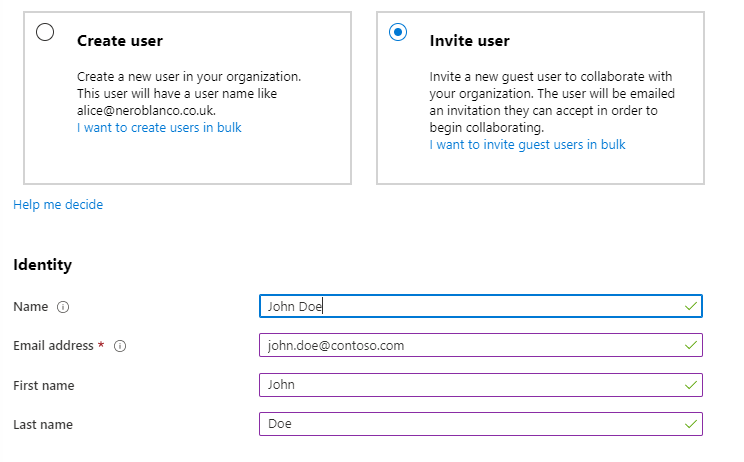
Creating Guest Accounts
When you create a Guest Account in Azure Active Directory, or invite a new Guest user to a Team (which in turn creates the Guest account in Azure Active Directory) the object is a short time later sync’d to Exchange Online as a MailUser. This is important because ultimately it is Exchange Online that is responsible for sending the Guest account notifications.
Note that MailUser is hidden from the GAL by default. (more about that later)
So, all things being equal you now have a Guest Account in Azure AD and a MailUser Exchange Online and everything works tickety-boo.
However for some users they are not receiving notifications. This is because almost certainly there was already another object representing this user’s email address in Exchange Online. It could be a Mail Contact or a Mail User / Mailbox with forwarding to an external email address.
The bottom line is that you cannot have a Guest Account and a recipient in Exchange Online that are sharing the same ExternalEmailAddress. Well almost… there are fudges and workarounds.
Scenarios
1. Partner Organizations
You have created Contacts for users that you collaborate with over email, then at a later point you add them as a Guest to a Team.
2. Don’t want Office 365 mail services
We have a client that has a distributed model of loosely coupled organizations maintaining their own IT infrastructure. A lot are simply using Hotmail, Gmail or other mail services accounts and do not need (or in some cases want) to use Office 365 Mailboxes. However they do all need to collaborate in a central Teams and SharePoint environment. To that end, they want their users to consume Teams and SharePoint workloads as Guests, but also have a parent organization email address forwarded to their personal email.
3. Divestiture
Let’s say a number of users breakaway to form their own company but will maintain close relations, perhaps they are an arm’s reach subsidiary and they therefore won’t be taking their domain name. We move the mailboxes, convert the legacy mailboxes to Mail-Enabled users, set a forwarding address to a Contact or external email address and hide them from the GAL so that they can maintain inbound email on the legacy Domain and legacy users can see them in the GAL as a Mail Contact and get Free Busy for them if Org Sharing is enabled.
Why not just create a Contact only? In a Cloud only world you cannot add a proxyAddress on to a Mail Contact with the same value as one of your accepted Domains – unless it is syncing from On-Premises AD via AAD Connect
So they only way for them to maintain the legacy Domain value natively is either a via Mail Enabled User or Mailbox with a forwarder. You wouldn’t use a Mailbox because that will cost you a license – but you could use a Shared Mailbox – more on that later too.
You could also use a Distribution Group, and their email as a proxyAddress and have a single member be the Contact to the target tenant.
The problem
In any of those cases, there is an object in Exchange Online that contains the recipients external email address.
Get-MailUser "John Doe" | FL DisplayName, PrimarySMTPAddress, ExternalEmailAddress DisplayName : John Doe PrimarySmtpAddress : john.doe@contoso.com ExternalEmailAddress : SMTP:john.doe@contoso.comERROR
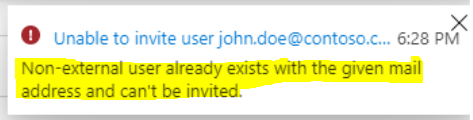
Even if you have a Mail Contact instead of a Mail-Enabled User you won’t be able to:
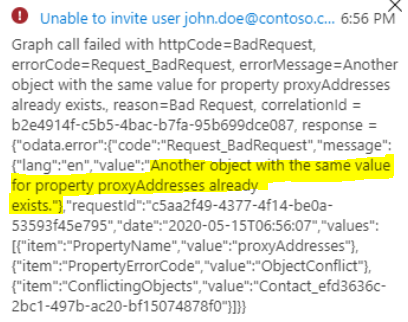
BUT, if I add this user to Microsoft Teams it works.
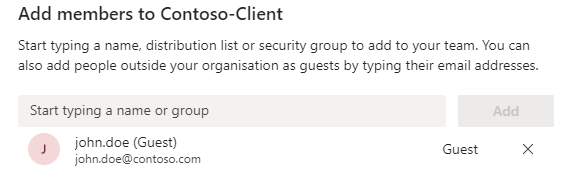
It does not fail – any error like above would inevitably lead to mass user confusion of course.
So now we have the Guest and the Mail Contact in Exchange Online.
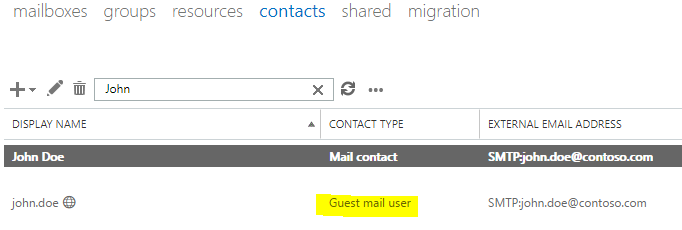
All good right? Not quite.
So what happens now?
ProxyAddresses
If you look at your AzureADUser object you will see that the ProxyAddresses attribute is empty.
Get-AzureADUser -SearchString john.doe | FL DisplayName, *mail*, proxy*, UserPrincipalName DisplayName : john.doeMail : john.doe@contoso.com
MailNickName : john.doe_contoso.com#EXT#
OtherMails : {john.doe@contoso.com}
ProxyAddresses : {}
UserPrincipalName : john.doe_contoso.com#EXT#@neroblancoit.onmicrosoft.com
And it is the empty proxyAddress that causes the issues going forward. This user will never receive notifications.
Solution – Guest Accounts ONLY
Solution, well in short you can’t have a Guest Account plus any other Exchange Online Recipient. You need to create the Guest Account and have it Shown in the GAL. you have to do this in two places.
Set-AzureADUser -ObjectId 66c30596-8d0c-48df-aac3-b9e3c5c4968e -ShowInAddressList:$TrueAnd in Exchange Online
Set-MailUser john.doe@contoso.com#ext# -HiddenFromAddressLists:$FalseWhy twice? Wll the second command may return no settings have changed, if the AzureAD attribute has flowed. Previously I have seen it not be flowing, but recently it seems to have been doing its job.
The Guest Account can now be added to Teams, SharePoint, Distribution Groups (via PowerShell) and Azure AD Groups. Plus it will appear in the GAL.
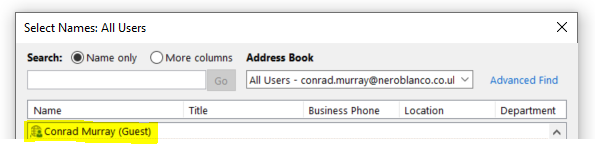
Other Potential Workarounds
Well, you can actually do two things
- Create Guest and Contact simultaneously.
If you time it right, you can create the Guest Account before the Contact, but you have to be quick. Create the Guest Account first and then immediately create the Contact – but you have to beat the Azure Sync clock…
I created my Guest Account
Get-AzureADUser -ObjectId 66c30596-8d0c-48df-aac3-b9e3c5c4968e | FL DisplayName, *mail* , proxy*, userP*, UserTypeMail : john.doe@contoso.com
MailNickName : john.doe_contoso.com#EXT#
OtherMails : {john.doe@contoso.com}
ProxyAddresses : {SMTP:john.doe@contoso.com}
UserPrincipalName : john.doe_contoso.com#EXT#@neroblancoit.onmicrosoft.com
UserType : Guest
Here is my Mail Contact
Get-MailContact john.doe | FL DisplayName, PrimarySMTPAddress, ExternalEmailAddress DisplayName : John Doe PrimarySmtpAddress : john.doe@contoso.com ExternalEmailAddress : SMTP:john.doe@contoso.combut… if you don’t beat the reaper you get this:
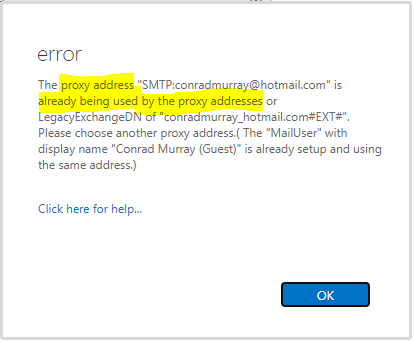
Shared Mailbox
Create a Shared Mailbox, use the ForwardingSMTPAddress attribute, then create the Guest Account
Here is my Shared Mailbox
Get-Mailbox john.doe | FL DisplayName, PrimarySMTPAddress, ForwardingSMTPAddress, RecipientTypeDetails, HiddenFromAddressListsEnabled, *created* DisplayName : John Doe (SMBX)PrimarySmtpAddress : john.doe@neroblanco.co.uk
ForwardingSmtpAddress : smtp:john.doe@contoso.com
RecipientTypeDetails : SharedMailbox
HiddenFromAddressListsEnabled : True
WhenMailboxCreated : 15/05/2020 19:54:39
WhenCreated : 15/05/2020 19:54:41
WhenCreatedUTC : 15/05/2020 07:54:41
You will note there is no such attribute for ExternalEmailAddress for a Mailbox
Get-Mailbox john.doe | FL DisplayName, external* DisplayName : John Doe (SMBX)ExternalOofOptions : External
ExternalDirectoryObjectId : 8d735d04-445e-491e-abd7-fd08661e2b4a
Here is my Guest user
Get-AzureADUser -ObjectId 2d3df948-4281-45a0-a23e-b42d1b5ba5bc | FL DisplayName, *mail*, proxy*, userp*, *date* DisplayName : John Doe (Guest)Mail : john.doe@contoso.com
MailNickName : john.doe_contoso.com#EXT#
OtherMails : {john.doe@contoso.com}
ProxyAddresses : {SMTP:john.doe@contoso.com}
UserPrincipalName : john.doe_contoso.com#EXT#@neroblancoit.onmicrosoft.com
RefreshTokensValidFromDateTime : 15/05/2020 08:01:13
Using this method though, I do not see the Guest Account sycn’d to Exchange Online as a MailUser nor any provisioning error.
So, in conclusion, the whole Guest experience and application from Microsoft isn’t great, but once you know what is going on you can unpick it. Where it gets painful is when you have to start deleting and r-creating Users, because you have to make a note of any Groups and Teams and SharePoint access they previously had and after you put it all back together you need to add them back.

Conrad Murray
Conrad Murray is a Microsoft Certified IT consultant working in IT for over 20 years specialising in the Messaging arena and in particular Office 365 and previously Microsoft Exchange On-Premises and IBM Domino. Working with like minded colleagues now delivering very large scale complex migrations from Office 365 to Office 365 (tenant to tenant), Lotus Notes and On-Premises Microsoft Exchange to Office 365.
News & Insights
Trusted insights on technology and innovation to power your business growth.


-
 03/06/2026
A practical engineering guide to owners, assignment, consent, credentials and ...
Read More

-
19/05/2026
Domain migrations in Microsoft 365 are rarely as simple as shifting email ...
Read More

-
12/05/2026
Over the past 10 to 15 years, Microsoft 365 has fundamentally reshaped how ...
Read More

-
07/05/2026
Yesterday we had an all company meeting and I thought it would be cool to kick ...
Read More

-
07/05/2026
Planning a tenant-to-tenant migration? Talk to us
Read More

-
31/03/2026
In tenant-to-tenant (T2T) and Google-to-Microsoft 365 migration projects, ...
Read More

-
27/03/2026
You’d think this would be easy and not an uncommon request. There are genuine ...
Read More

-
23/03/2026
Managing Google to Microsoft Migration with GAM7 and PowerShell
Read More

-
16/03/2026
When a user leaves an organisation in Microsoft 365, administrators have ...
Read More
