This document seeks to identify the potential pitfalls of Inbound SMTP routing to Domino in a Coexistence environment, particularly when using a static targetAddress that is built by a Directory Synchronisation solution.
In a Binary Tree Coexistence scenario Microsoft Exchange will use the targetAddress value of an AD Contact or Mail-Enabled User. The targetAddress is typically added by Binary Tree SMART DirSync software.
Typically this will look something like: firstname.lastname@domino.contoso.com
When Binary Tree SMART DirSync is set to use the scalar function dbo.ReplaceDomain (as opposed to dbo.UpdateInternetAddress) it will always statically be @domino.contoso.com
When Binary Tree SMART DirSync is set to use the scalar function dbo.UpdateInternetAddress (as opposed to dbo.ReplaceDomain) it will always dynamically be set to @domino.[user-smtpname-space.com]
This therefore requires the Domino Global Domain Document to list on the Alternate Internet domain aliases: section the entry domino.contoso.com (much like an Accepted Domain in Exchange)
SMTP Address Conversion |
|
Local primary Internet domain: |
contoso.com |
Alternate Internet domain aliases: |
tailspintoys.com widgets.com acme.com domino.contoso.com |
When using full name matching, the Router searches the Domino Directory ($Users) view for an exact match of the entire SMTP address (for example, first.last@contoso.com)
If an exact match is not found, the Router performs a secondary search if the domain suffix of the incoming address is listed in the Global domain document as an Internet domain alias.
For this secondary search, the Router replaces the given domain suffix with the domain suffix designated in the Global domain document as the Primary domain name
Take an email to user Conrad Murray from Microsoft Exchange (or Office 365) it will route to the targetAddress of: conrad.murray@domino.contoso.com
Basics |
|
|
||
First name: |
Conrad |
Mail system: |
Notes |
|
Middle name: |
Domain: |
NotesWorld |
||
Last name: |
Murray |
Mail server: |
MailServer1/NotesWorld |
|
User name: |
Conrad |
Mail file: |
mail\cmurray |
|
Conrad Murray |
Forwarding address: |
|||
Internet address: |
conrad.murray@contoso.com |
|||
Alternate name: |
|
|
||
|
|
|||
Short name/UserID: |
cmurray |
|||
First the router task will look for explicit entry of conrad.murray@domino.contoso.com in any email field e.g. InternetAddress, Fullname Field, Shortname Field
Next, will look for localpart @ Local primary internet domain, conrad.murray@contoso.com in this case again explicit entries in on an explicit match on: InternetAddress, Fullname Field, Shortname Field
Success on conrad.murray@contoso.com
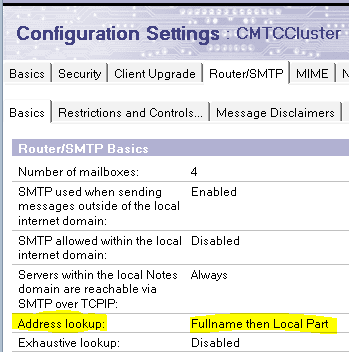
If there is no match there, and assuming Domino is configured to do address look-up on Fullname then localpart on the Server Configuration Document,
then it will lastly fall back to Local Part of internet address – but only when the Internet Address domain of the recipient’s inbound email is a match to aPrimary Domain of a Global Domain Document.
LocalPart matching is NOT used when the recipients Internet Address Domain is one of the alternates only. See example later.
The Router searches the Domino Directory for a match of the local part of the Internet address, that is, the part before the @ symbol.
Local part matching matches periods and underscores in the address with spaces in the directory.
The gotcha here is that the ($Users) view does NOT actually include the left part of Internet Addresses in the view. It implies that it does, but actually it only (mainly) includes:
That’s great, but what about neil.langston@tailspintoys.com?
Basics |
|
|
|
First name: |
Neil |
Mail system: |
Notes |
Middle name: |
Domain: |
NotesWorld |
|
Last name: |
Langston |
Mail server: |
MailServer1/NotesWorld |
User name: |
Neil |
Mail file: |
mail\nlangsto |
Neil Langston |
Forwarding address: |
||
Internet address: |
neil.langston@tailspintoys.com |
||
Alternate name: |
|
|
|
|
|
||
Short name/UserID: |
nlangsto |
||
This email from Exchange will look like neil.langston@domino.contoso.com
Part 3 fails, (even though neil.langston is a valid local part), because the router did NOT drop back to option 3 – Localpart look-up because tailspintoys.com is NOT a primary Domain on a Global Domain Document.
For Localpart look-ups to succeed the users’ SMTP Domain Name entry must be it’s own Global Domain Document Local primary internet domain. In our example @tailspintoys.com is ONLY listed in a Global Domain Document as an Alternate Internet Domain alias
What about this user: Twan van Beers
Basics |
|
|
|
First name: |
Twan |
Mail system: |
Notes |
Middle name: |
Domain: |
NotesWorld |
|
Last name: |
Van Beers |
Mail server: |
MailServer1/NotesWorld |
User name: |
Twan van |
Mail file: |
mail\TvanBeer |
Twan van |
Forwarding address: |
||
Internet address: |
tvb@widgets.com |
||
Alternate name: |
|
|
|
|
|
||
Short name/UserID: |
TvanBeer |
||
This email from Exchange will look like tvb@domino.contoso.com
Part 3 fails for two reasons:
widgets.com is NOT a primary Domain on a Global Domain Document and therefore localpart look-up is not initiated by the router, and
well, obviously TVB doesn’t exist as a localpart anyway!
($Users) view will only have
but not just tvb
Basics |
|
|
||
First name: |
Guillaume |
Mail |
Notes |
|
Middle |
Domain: |
NotesWorld |
||
Last name: |
Meister |
Mail |
MailServer2/NotesWorld |
|
User name: |
Guillaume Meister/Paris/IT/FR |
Mail file: |
mail\cmurray |
|
Guillaume Meister |
Forwarding |
|||
Internet |
guillaume.meister@contoso.com |
|||
Alternate |
|
|
||
|
|
|||
Short name/UserID: |
gmeister |
|||
This email from Exchange will look like gmeister@domino.contoso.com
Let’s just assume explicit routing and fall back explicit routing successes for such Mail-In Databases and Rooms like:
But what about these examples:
Basics |
|
Mail-in name: |
London Sales Office |
Description: |
|
Internet Address: |
sales@tailspintoys.com |
Internet message storage: |
No Preference |
Encrypt incoming mail: |
No |
This email from Exchange will look like sales@domino.contoso.com
In the ($Users) view only London Sales Office will be present (along with sales@tailspintoys.co.uk )
Basics |
|
Resource type: |
Room |
Resource name: |
Ground Floor Presentation Room 1/More |
Capacity: |
20 |
Resource description: |
Ground Floor Presentation Room 1 |
Internet Address: |
GF1.Room@acme.com |
Comments: |
|
This email from Exchange will look like GF1.Room@domino.contoso.com
In the ($Users) view only:
will be present.
The solution is to either:
A) Use the use the scalar function dbo.UpdateInternetAddress but that then requires significantly more configuration for Coexistence including:
B) Stamp the full targetAddress values on ALL Users, Mail-In Database and Rooms & Resources in the Fullname field.
The Global Domain Document will not resolve an alternate to an alternate within itself i.e.
John.smith@domino.acme.com will not then look also to john.smith@acme.com
SMTP Address Conversion |
|
Local primary Internet domain: |
contoso.com |
Alternate Internet domain aliases: |
tailspintoys.com widgets.com acme.com domino.contoso.com domino.tailspintoys.com domino.widgets.com domino.acme.com |
John.smith@domino.acme.com will only ever try next John.smith@contoso.com and john.smith (John Smith / John_Smith)
To prevent the Router from using domain aliases when looking up addresses, do not include alternate Internet domain aliases in a Global
domain document. Instead, create multiple Global Domain documents, each specifying a different primary Internet domain.
e.g.
SMTP Address Conversion |
|
Local primary Internet domain: |
contoso.com |
Alternate Internet domain aliases: |
domino.contoso.com |
SMTP Address Conversion |
|
Local primary Internet domain: |
acme.com |
Alternate Internet domain aliases: |
domino.acme.com |
SMTP Address Conversion |
|
Local primary Internet domain: |
widgets.com |
Alternate Internet domain aliases: |
domino.widgets.com |
SMTP Address Conversion |
|
Local primary Internet domain: |
tailspintoys.com |
Alternate Internet domain aliases: |
domino.tailspintoys.com |
NOTE:
Remember to only set ONE Global Domain Document to Use as default Global Domain (for use with all Internet protocols except HTTP):
Global domain role: |
R5/R6/R7/R8 Internet Domains or R4.x |
Use as default Global Domain (for use |
Yes |