



-
 Conrad Murray
-
 27 March, 2015
Exchange to Domino Routing Rules specifically relating to Binary Tree Coexistence Solutions
Introduction
This document seeks to identify the potential pitfalls of Inbound SMTP routing to Domino in a Coexistence environment, particularly when using a static targetAddress that is built by a Directory Synchronisation solution.
Routing from Exchange/Office 365 to Domino
In a Binary Tree Coexistence scenario Microsoft Exchange will use the targetAddress value of an AD Contact or Mail-Enabled User. The targetAddress is typically added by Binary Tree SMART DirSync software.
Typically this will look something like: firstname.lastname@domino.contoso.com
When Binary Tree SMART DirSync is set to use the scalar function dbo.ReplaceDomain (as opposed to dbo.UpdateInternetAddress) it will always statically be @domino.contoso.com
When Binary Tree SMART DirSync is set to use the scalar function dbo.UpdateInternetAddress (as opposed to dbo.ReplaceDomain) it will always dynamically be set to @domino.[user-smtpname-space.com]
This therefore requires the Domino Global Domain Document to list on the Alternate Internet domain aliases: section the entry domino.contoso.com (much like an Accepted Domain in Exchange)
SMTP Address Conversion |
|
Local primary Internet domain: | contoso.com |
Alternate Internet domain aliases: | tailspintoys.com widgets.com acme.com domino.contoso.com |
Routing processing order in Domino
When using full name matching, the Router searches the Domino Directory ($Users) view for an exact match of the entire SMTP address (for example, first.last@contoso.com)
If an exact match is not found, the Router performs a secondary search if the domain suffix of the incoming address is listed in the Global domain document as an Internet domain alias.
For this secondary search, the Router replaces the given domain suffix with the domain suffix designated in the Global domain document as the Primary domain name
Take an email to user Conrad Murray from Microsoft Exchange (or Office 365) it will route to the targetAddress of: conrad.murray@domino.contoso.com
Basics |
|
| ||
First name: | Conrad | Mail system: | Notes | |
Middle name: | Domain: | NotesWorld | ||
Last name: | Murray | Mail server: | MailServer1/NotesWorld | |
User name: | Conrad | Mail file: | mail\cmurray | |
Conrad Murray | Forwarding address: | |||
Internet address: | conrad.murray@contoso.com | |||
Alternate name: |
|
| ||
|
| |||
Short name/UserID: | cmurray | |||
First the router task will look for explicit entry of conrad.murray@domino.contoso.com in any email field e.g. InternetAddress, Fullname Field, Shortname Field
Next, will look for localpart @ Local primary internet domain, conrad.murray@contoso.com in this case again explicit entries in on an explicit match on: InternetAddress, Fullname Field, Shortname Field
Success on conrad.murray@contoso.com
Localpart Look-up/Matching
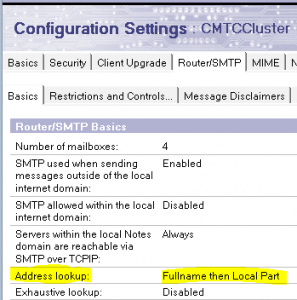
If there is no match there, and assuming Domino is configured to do address look-up on Fullname then localpart on the Server Configuration Document,
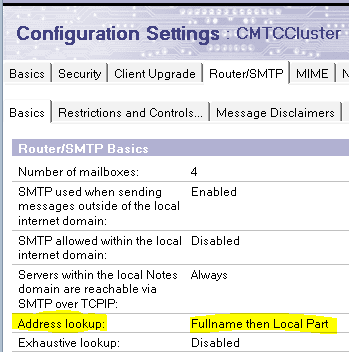
then it will lastly fall back to Local Part of internet address – but only when the Internet Address domain of the recipient’s inbound email is a match to aPrimary Domain of a Global Domain Document.
LocalPart matching is NOT used when the recipients Internet Address Domain is one of the alternates only. See example later.
The Router searches the Domino Directory for a match of the local part of the Internet address, that is, the part before the @ symbol.
Local part matching matches periods and underscores in the address with spaces in the directory.
The gotcha here is that the ($Users) view does NOT actually include the left part of Internet Addresses in the view. It implies that it does, but actually it only (mainly) includes:
- ListName
- FullName
- InternetAddress
- @NAME ([CN] ;dn)
- @NAME ([Abbrieviate] ;FullName)
- FirstName + LastName
- FirstName
- LastName
- Shortname
- And, @Soundex variations plus AltFullName,NetUserName,LTPA_UsrNm,DB2_UserName
That’s great, but what about neil.langston@tailspintoys.com?
Basics |
|
| |
First name: | Neil | Mail system: | Notes |
Middle name: | Domain: | NotesWorld | |
Last name: | Langston | Mail server: | MailServer1/NotesWorld |
User name: | Neil | Mail file: | mail\nlangsto |
Neil Langston | Forwarding address: | ||
Internet address: | neil.langston@tailspintoys.com | ||
Alternate name: |
|
| |
|
| ||
Short name/UserID: | nlangsto | ||
This email from Exchange will look like neil.langston@domino.contoso.com
- Look-up Explicit email address neil.langston@domino.contoso.com = FAIL
- Look-Up localpart + primary GDD Domain neil.langston@contoso.com = FAIL
- Lookup Localpart only neil.langston = FAIL
Part 3 fails, (even though neil.langston is a valid local part), because the router did NOT drop back to option 3 – Localpart look-up because tailspintoys.com is NOT a primary Domain on a Global Domain Document.
For Localpart look-ups to succeed the users’ SMTP Domain Name entry must be it’s own Global Domain Document Local primary internet domain. In our example @tailspintoys.com is ONLY listed in a Global Domain Document as an Alternate Internet Domain alias
What about this user: Twan van Beers
Basics |
|
| |
First name: | Twan | Mail system: | Notes |
Middle name: | Domain: | NotesWorld | |
Last name: | Van Beers | Mail server: | MailServer1/NotesWorld |
User name: | Twan van | Mail file: | mail\TvanBeer |
Twan van | Forwarding address: | ||
Internet address: | tvb@widgets.com | ||
Alternate name: |
|
| |
|
| ||
Short name/UserID: | TvanBeer | ||
This email from Exchange will look like tvb@domino.contoso.com
- Look-up Explicit email address tvb@domino.contoso.com = FAIL
- Look-Up localpart + primary GDD Domain tvb@contoso.com = FAIL
- Lookup Localpart only tvb = FAIL
Part 3 fails for two reasons:
widgets.com is NOT a primary Domain on a Global Domain Document and therefore localpart look-up is not initiated by the router, and
well, obviously TVB doesn’t exist as a localpart anyway!
($Users) view will only have
- Twan van Beers/London/IT/UK
- Twan van Beers
- TvanBeer
- tvb@widgets.com
but not just tvb
Localpart look-up successes
Basics |
|
| ||
First name: | Guillaume | Mail | Notes | |
Middle | Domain: | NotesWorld | ||
Last name: | Meister | Mail | MailServer2/NotesWorld | |
User name: | Guillaume Meister/Paris/IT/FR | Mail file: | mail\cmurray | |
Guillaume Meister | Forwarding | |||
Internet | guillaume.meister@contoso.com | |||
Alternate |
|
| ||
|
| |||
Short name/UserID: | gmeister | |||
This email from Exchange will look like gmeister@domino.contoso.com
- Look-up Explicit email address gmeister@domino.contoso.com = FAIL
- Look-Up localpart + primary GDD Domain gmeister@contoso.com = FAIL
- Lookup Localpart only gmeister = SUCCESS!
Mail-In Databases and Rooms & Resources
Let’s just assume explicit routing and fall back explicit routing successes for such Mail-In Databases and Rooms like:
- IT.Support@contoso.com ( IT.Support@domino.contoso.com )
- GroundFloor.ConferenceRoom@contoso.com ( GroundFloor.ConferenceRoom@domino.contoso.com )
But what about these examples:
Basics |
|
Mail-in name: | London Sales Office |
Description: |
|
Internet Address: | sales@tailspintoys.com |
Internet message storage: | No Preference |
Encrypt incoming mail: | No |
This email from Exchange will look like sales@domino.contoso.com
- Look-up Explicit email address sales@domino.contoso.com = FAIL
- Look-Up localpart + primary GDD Domain sales@contoso.com = FAIL
- Lookup Localpart only sales = FAIL
In the ($Users) view only London Sales Office will be present (along with sales@tailspintoys.co.uk )
Rooms
Basics |
|
Resource type: | Room |
Resource name: | Ground Floor Presentation Room 1/More |
Capacity: | 20 |
Resource description: | Ground Floor Presentation Room 1 |
Internet Address: | GF1.Room@acme.com |
Comments: |
|
This email from Exchange will look like GF1.Room@domino.contoso.com
- Look-up Explicit email address GF1.Room@domino.contoso.com = FAIL
- Look-Up localpart + primary GDD Domain GF1.Room@contoso.com = FAIL
- Lookup Localpart only sales = FAIL
In the ($Users) view only:
- Ground Floor Presentation Room 1
- Ground Floor Presentation Room 1/More London Place and
- GF1.Room@acme.com
will be present.
The solution is to either:
A) Use the use the scalar function dbo.UpdateInternetAddress but that then requires significantly more configuration for Coexistence including:
- Multiple DNS entries for autodiscover A records
- Multiple Exchange AvailabilityAddressSpace
- Multiple Exchange Remote Domains
- SAN Certificate on BT Free Busy IIS
- Multiple MAPs in the Application Settings of IIS
- Multiple Global Domain Documents – see APPENDIX A
B) Stamp the full targetAddress values on ALL Users, Mail-In Database and Rooms & Resources in the Fullname field.
Appendix A
The Global Domain Document will not resolve an alternate to an alternate within itself i.e.
John.smith@domino.acme.com will not then look also to john.smith@acme.com
SMTP Address Conversion |
|
Local primary Internet domain: | contoso.com |
Alternate Internet domain aliases: | tailspintoys.com widgets.com acme.com domino.contoso.com domino.tailspintoys.com domino.widgets.com domino.acme.com |
John.smith@domino.acme.com will only ever try next John.smith@contoso.com and john.smith (John Smith / John_Smith)
To prevent the Router from using domain aliases when looking up addresses, do not include alternate Internet domain aliases in a Global
domain document. Instead, create multiple Global Domain documents, each specifying a different primary Internet domain.
e.g.
SMTP Address Conversion |
|
Local primary Internet domain: | contoso.com |
Alternate Internet domain aliases: | domino.contoso.com |
SMTP Address Conversion |
|
Local primary Internet domain: | acme.com |
Alternate Internet domain aliases: | domino.acme.com |
SMTP Address Conversion |
|
Local primary Internet domain: | widgets.com |
Alternate Internet domain aliases: | domino.widgets.com |
SMTP Address Conversion |
|
Local primary Internet domain: | tailspintoys.com |
Alternate Internet domain aliases: | domino.tailspintoys.com |
NOTE:
Remember to only set ONE Global Domain Document to Use as default Global Domain (for use with all Internet protocols except HTTP):
Global domain role: | R5/R6/R7/R8 Internet Domains or R4.x |
Use as default Global Domain (for use | Yes |

Conrad Murray
Conrad Murray is a Microsoft Certified IT consultant working in IT for over 20 years specialising in the Messaging arena and in particular Office 365 and previously Microsoft Exchange On-Premises and IBM Domino. Working with like minded colleagues now delivering very large scale complex migrations from Office 365 to Office 365 (tenant to tenant), Lotus Notes and On-Premises Microsoft Exchange to Office 365.
News & Insights
Trusted insights on technology and innovation to power your business growth.


-
 03/06/2026
A practical engineering guide to owners, assignment, consent, credentials and ...
Read More

-
19/05/2026
Domain migrations in Microsoft 365 are rarely as simple as shifting email ...
Read More

-
12/05/2026
Over the past 10 to 15 years, Microsoft 365 has fundamentally reshaped how ...
Read More

-
07/05/2026
Yesterday we had an all company meeting and I thought it would be cool to kick ...
Read More

-
07/05/2026
Planning a tenant-to-tenant migration? Talk to us
Read More

-
31/03/2026
In tenant-to-tenant (T2T) and Google-to-Microsoft 365 migration projects, ...
Read More

-
27/03/2026
You’d think this would be easy and not an uncommon request. There are genuine ...
Read More

-
23/03/2026
Managing Google to Microsoft Migration with GAM7 and PowerShell
Read More

-
16/03/2026
When a user leaves an organisation in Microsoft 365, administrators have ...
Read More
