



-
 Conrad Murray
-
 03 July, 2025
Decommission DirSync
New Users
Depending on how your new joiner process is structured, you are most likely initiating user creation in Active Directory or an HR system that is populating Active Directory and other systems. Therefore, a new joiner request is already most likely being sent to the Notes Admin team or an automation process. So that process would remain. It is unlikely that DirSync is backwardly creating Notes Person Documents.
New Notes Mail-In Databases
It would be unusual now for new Notes Mail-In Databases to be created given how far along you would be in your transition to Microsoft. Almost certainly you will be using Shared Mailboxes, or probably Microsoft 365 Groups / Microsoft Teams.
If for any reason there are still new notes Mail-In Databases being created, then the corresponding Active Directory object would need to be manually created with all the correct attributes like targetAddress and proxyAddresses. This would require a process created or updated.
New Groups
Much like Mail-In Databases, net new Groups are most likely no longer be being created in Domino, but Groups created in Exchange are potentially being added to Domino to ensure consistency across the platform. Again, a process for creating in both may be required that sets the mail attribute and proxyAddresses.
Updating Group Memberships
This is almost certainly the number one reason for retaining Directory Synchronisation.
The ambition here should be to switching the authoritative membership away from Domino and instead perform all updates only in Active Directory, and ultimately even having Groups mastered in Exchange Online or Entra.
So, how best to achieve this without the need to perform dual updates?
Remediation of Group Memberships
Mail Groups
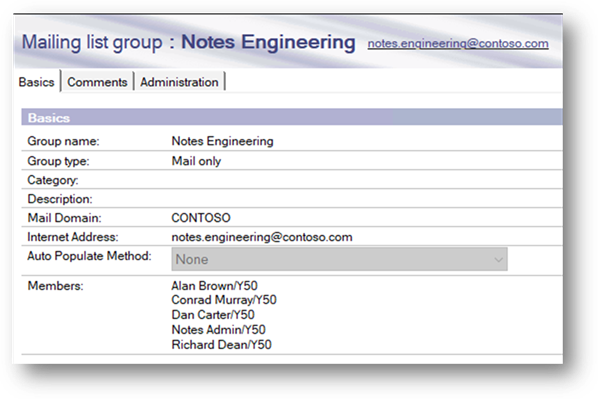
Ignoring ACL Only Groups and Multi-Purpose groups for now, the short answer is to have a single member in a Domino Group. And that member should be the smtp address of at least one of the proxyAddresses on the Group object in Exchange Online. e.g. If I have a Distribution Group called “Notes Engineering” with a primary SMTP Address of notes.engineering@contoso.com and 5 members,
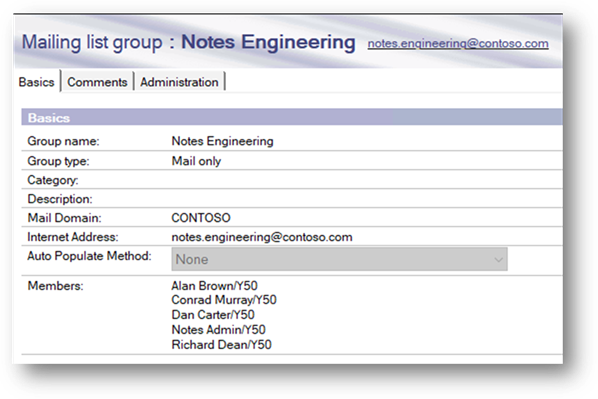
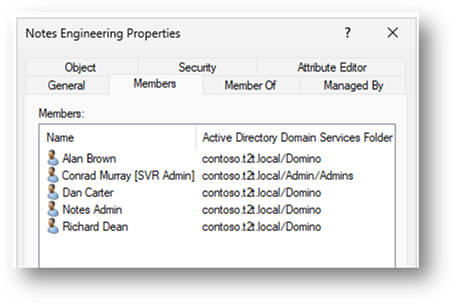
Then first I need to make sure that the corresponding AD Group is up to date, mark it out of scope of DirSync and ensure that no deletion of that out-of-scope object flows during a DirSync operation.
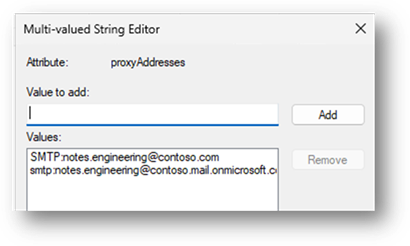
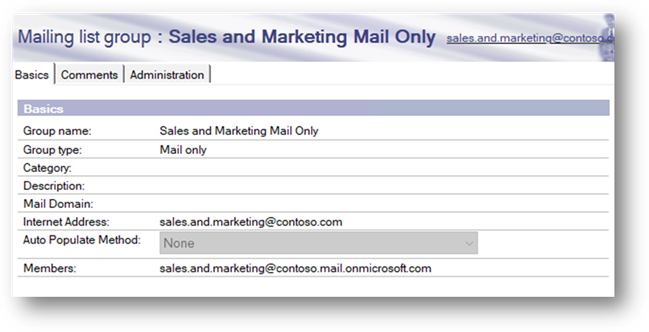
Then update the Domino Group membership with a single member of: notes.engineering@contoso.mail.onmicrosoft.com
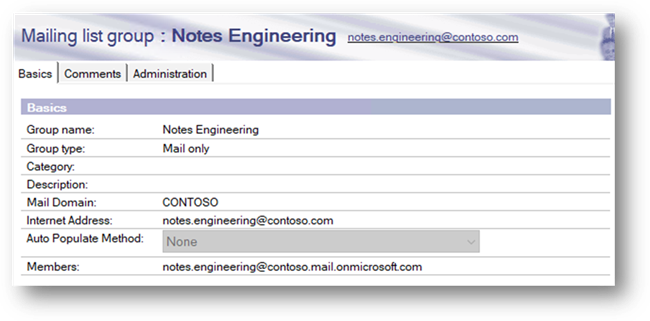
Thus, when an email is sent from within the Domino mail system, it will hit that group and route to Exchange Online. EXO will resolve that to the proxyAddress of the Group and then will be bifurcated to all the members.
Access Control List only Groups
For Access Control List “ACL” only groups, if these have been synchronised at all, these will have been sync’d as AD Security Groups.
In my experience ACL-only groups are generally not synchronised or if they are they have typically been one-off as they are generally not fit for purpose in Active Directory as they are designed for Notes applications like with names like _READERS, _EDITORS, _MANAGERS which often doesn’t make sense for non Notes Applications.
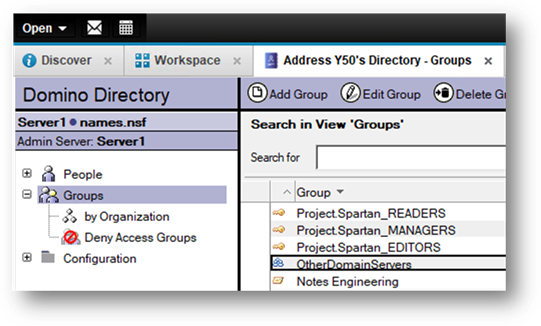
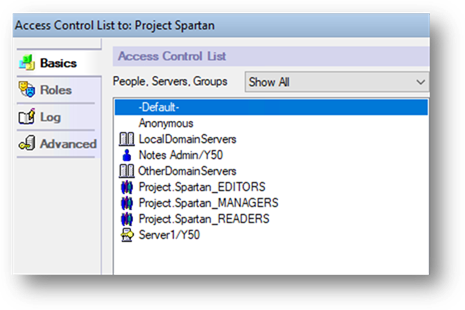
If new ACL Groups are being created and they are genuinely needed in AD, then that process will have to be manually managed through process documentation.
Multi-purpose Groups
This is where the real challenge is. Often these are the majority of Groups in a Domino environment because this is the default group type when creating groups.
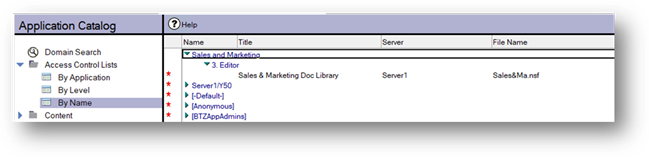
You will need to conduct an audit of Notes Application ACLs. The Domino Domain Catalog can help here. You won’t be able to see if they are Multi-purpose or ACL Only, so you should be able to add a column to the view that will look up the Domino Directory to retrieve the Group Type.
Remediation of Multi-purpose Groups
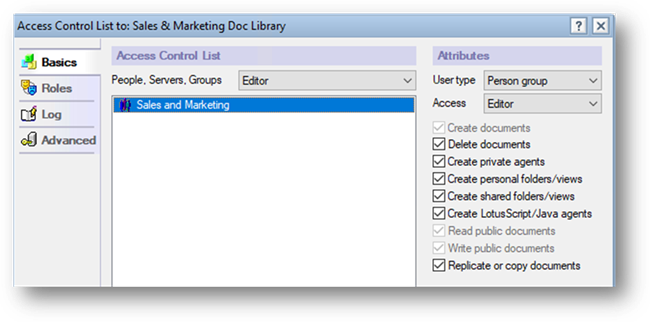
Where you see a multi-purpose group is on an ACL you should duplicate it. Convert the original Group to an ACL-only group and remove the group email address. Then make the group you duplicated a Mail Only group and follow the guidance for Mail-only groups.
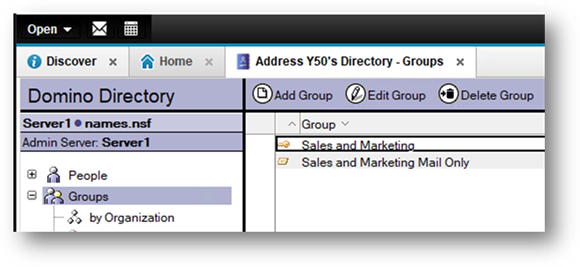
The ACL can remain untouched and continue to work.
Update the new Group and append “Mail Only” and have one recipient.
Decommission Binary Tree DirSync and Coexistence – Part 1
Decommission Binary Tree DirSync and Coexistence – Part 3

Conrad Murray
Conrad Murray is a Microsoft Certified IT consultant working in IT for over 20 years specialising in the Messaging arena and in particular Office 365 and previously Microsoft Exchange On-Premises and IBM Domino. Working with like minded colleagues now delivering very large scale complex migrations from Office 365 to Office 365 (tenant to tenant), Lotus Notes and On-Premises Microsoft Exchange to Office 365.
News & Insights
Trusted insights on technology and innovation to power your business growth.


-
 03/06/2026
A practical engineering guide to owners, assignment, consent, credentials and ...
Read More

-
19/05/2026
Domain migrations in Microsoft 365 are rarely as simple as shifting email ...
Read More

-
12/05/2026
Over the past 10 to 15 years, Microsoft 365 has fundamentally reshaped how ...
Read More

-
07/05/2026
Yesterday we had an all company meeting and I thought it would be cool to kick ...
Read More

-
07/05/2026
Planning a tenant-to-tenant migration? Talk to us
Read More

-
31/03/2026
In tenant-to-tenant (T2T) and Google-to-Microsoft 365 migration projects, ...
Read More

-
27/03/2026
You’d think this would be easy and not an uncommon request. There are genuine ...
Read More

-
23/03/2026
Managing Google to Microsoft Migration with GAM7 and PowerShell
Read More

-
16/03/2026
When a user leaves an organisation in Microsoft 365, administrators have ...
Read More
