



-
 Twan van Beers
-
 21 November, 2016
In Office 365 there are now many similar options available for collaboration. You now have the traditional Distribution Lists (aka Distribution Groups), Office 365 Groups, Yammer and more recently Teams, and of course there is also SharePoint, OneDrive and Skype for Business.
So with all this choice… how do you choose?
What is available
Microsoft’s thinking seems to be why not use all of them depending on your need, and strategically they will bring out advancements in Delve (or Personal Analytics) and Enterprise Search so that you can find what you want to know no matter that content was created
Ok so brief run down of each option
Distribution Lists
Distribution Lists are the traditional way to get messages out to a group of people, be they inside or outside the organisation. The members can’t really collaborate other than reply to all, which works however as the NHS recently found out it can be disruptive if there is a large membership,
Office 365 Groups
Office 365 groups tie a number of Office 365 features together including OneNote, SharePoint/OneDrive, Planner, Calendar and Site Mailboxes. These were Microsoft’s first attempt at trying to create something more holistic instead of the traditional silos. O365 Groups can work well for up to 1000 members, after that performance of conversations can get affected. By default any user can create an O365 group up to a maximum of 250 groups per user.
Yammer
Yammer is also sometimes referred to as a Facebook for Business. Personally I’m not a massive fan of Yammer as it is yet something else to monitor, however if it is implemented well and full adopted then it can be useful. Microsoft have started to use the term “Work Out Loud”, so by that I think they mean instead of researching things yourself all the time just say what you are working on or exploring, and then see who else knows about that and perhaps already has a solution.
SharePoint
SharePoint has been part of Office 365 since day 1 and as well as the more commonly used file store replacement, it is great at workflow, forms and other more advanced implementations. It works well both inside the organization and outside and more recently allows co-authoring of documents for Office file types.
OneDrive for Business
OneDrive is a home drive replacement, although I think Microsoft needs to rethink the sync client so that it is more of a most recently/most desirable cache instead of an all document sync or user managed selective sync. It is built on SharePoint and fundamentally has similar features to a SharePoint site collection used for file storage.
Skype for Business
Skype for Business is an Instant Messaging, online meeting system where you can have virtual meetings both within the organization or including members outside of your organization. It is similar to the consumer version of Skype, albeit without persistent chat.
Teams
Microsoft’s latest attempt at bringing together the various Office 365 technologies including OneNote, SharePoint/OneDrive, Calendar, and persistent chat. It is still only in public preview, however you can see that this is bound to replace Office 365 groups altogether in the future. In fact I’m wondering if the Teams client will eventually replace all of the Microsoft clients and roll them into a unified interface.
Choosing what to use when
A good picture that describes the choices is shown below. It was created before Teams was announced and presented at Ignite. To me Teams and Office 365 groups largely fill the same space, perhaps Teams ultimately taking over a portion of the Skype for Business Online Meetings area.
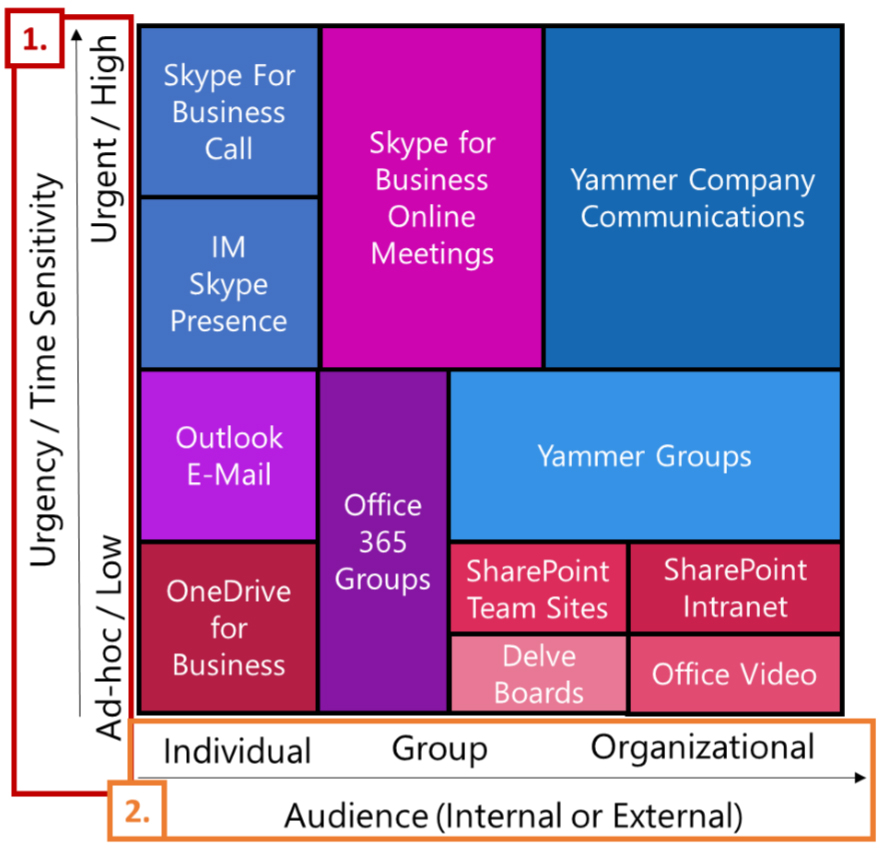
So as you can see based on the urgency of communication and the audience you can work out which is a good tool to explore. The big thing to take from the above is that you don’t just choose a single product. You use whichever product is appropriate/desired for the problem you are trying to solve. I’d add Distribution Lists to the above and use them for large internal/external memberships, especially for announcements that you don’t just want to post on Yammer or the Intranet.
How can I keep up with all of that
Yes I hear ya… how do you keep up with the influx of data and the various clients/notifications. It is a daily struggle for most people and I think it will continue to be that way for the immediate future. I can see how Delve (or now known My Analytics) and Enterprise Search are likely to mature to the point where Delve will make sure you see the things you are interested in and need to take action on, and Enterprise Search allows you to find what you are after no matter which tool it is in (of course as long as it is in Office 365, no doubt… 🙂 )
There is a great whitepaper from 2toLead which goes into a lot more details of the various options and scenarios. So wrapping up, there is no real easy answer to what tool do I use when. We’d love to hear how you choose which tool to use and are happy to discuss your requirements and see which tool(s) may fit the bill.

Twan van Beers
Twan is a senior consultant with over 30 years of experience. He has a wide range of skills including Messaging, Active Directory, SQL, Networking and Firewalls. Twan loves to write scripts and get deep and dirty into debugging code, in order to understand and resolve the most complex of problems.
News & Insights
Trusted insights on technology and innovation to power your business growth.


-
 03/06/2026
A practical engineering guide to owners, assignment, consent, credentials and ...
Read More

-
19/05/2026
Domain migrations in Microsoft 365 are rarely as simple as shifting email ...
Read More

-
12/05/2026
Over the past 10 to 15 years, Microsoft 365 has fundamentally reshaped how ...
Read More

-
07/05/2026
Yesterday we had an all company meeting and I thought it would be cool to kick ...
Read More

-
07/05/2026
Planning a tenant-to-tenant migration? Talk to us
Read More

-
31/03/2026
In tenant-to-tenant (T2T) and Google-to-Microsoft 365 migration projects, ...
Read More

-
27/03/2026
You’d think this would be easy and not an uncommon request. There are genuine ...
Read More

-
23/03/2026
Managing Google to Microsoft Migration with GAM7 and PowerShell
Read More

-
16/03/2026
When a user leaves an organisation in Microsoft 365, administrators have ...
Read More
