



-
 Twan van Beers
-
 30 December, 2016
Wow the first two weeks have whizzed on by, in fact together with my normal workload I’m struggling to keep up with the pace! So far we have covered
- Windows 10/Windows Server 2016 – Platform Security and Internals
- Attacks on Credentials & Prevention Solutions
- Attacking & Securing Windows Network
- Handling Ransomware & Other Malicious Software
This week we are going to cover
Implementing Security Policy Settings
Group Policy Object issues
1. The default policy objects have been corrupted, messed up, or lost
2. Migrating policy objects can be problematic
3. Troubleshooting with Windows Server 2016
4. Group Filtering
5. Remote Update
6. Group Policy Objects are not applying
Group Policy Objects settings
From a security perspective the interesting areas include
- Advanced Audit Policy Configuration
- User Rights Assignment
- Security Options
Specific settings that are of interest
- Add any service account, and also set Workstations in AD Users and Computers to restrict the service account only to the servers it is meant for
- Add ‘Local Account’ as best practice, ‘Local account and member of Administrator group’ for Windows clusters, or at least the Administrator account to mitigate Pass-the-Hash attacks. Install KB2871997 for Windows 7 and 8
- Add Domain Admins, Schema Admins and Enterprise Admins for everything except Domain Controllers, to mitigate credential theft and Pass-the-Ticket attacks for these accounts
- The setting Configure Logon Script Delay is set to 5 minutes by default. If you want to make it more immediate (although the question might be why are you using a logon script) then set it to 0
- The setting Always wait for the network at computer startup and logon is set to Disabled by default. You can set it to Enabled however that does mean that GPOs wait for the network to be available and then apply synchronously. This can literally add minutes to a logon process…
Group Policy Preferences issues
1. GPP User name and Password information are decryptable
2. Internet Explorer Settings
Best practices for Group Policy Objects
1. Back them up regularly
2. Use tools to check on AD
AD Info can be used to check on Group Policy Objects
3. Use Group Policy Results
4. Use PowerShell to keep GPOs tidy
Import-Module GroupPolicyFind all Non-linked GPOs
Get-GPO -All | ? { (Get-ADObject -Filter ( "GpLink -like '*{0}*' -f $_.ID ) ) -eq $null } | sort DisplayName | ft DisplayNameImplementing Advanced GPO Management (AGPM)
AGPM is available to customers who have Software Assurance since AGPM is part of the Microsoft Desktop Optimization Pack (MDOP) Implementing AGPM requires the following steps:
- Install the AGPM Server software
- Assign the AGPM Administrator role to an account or group
- Run AGPM and assign the other AGPM roles
- Install the AGPM Client software
- Configure AGPM and delegate access to GPOs by assigning roles to other accounts
Some features or flows that are available within AGPM once deployed
- Request the creation of a GPO, which must be approved by someone with the Approver role
- Check the GPO out of the archive, edit the GPO, check the GPO into the archive and request deployment of the GPO, which must then be approved by someone with the Approver role
- Review the GPO and deploy it to your production environment
- Create a GPO template and use it as a starting point to create a new GPO
- Delete and Restore a GPO
Offline Access – Threats and Prevention
What is Bitlocker
- Technology that helps to protect data from being accessed by unauthorized users who come into possession of lost, stolen or improperly decommissioned computers.
- Technology that validates the integrity of the early startup components before allowing the operating system to start
- Full drive encryption technology
What is a Trusted Platform Module (TPM)
- Smartcard-like module on the motherboard
- Performs cryptographic functions
- Holds platform measurements (hashes)
- Can create, store and manage keys
- Protects secrets and protects itself against attacks
Platform Configuration Register (PCR)
BitLocker relies on the system being able to verify that it hasn’t been changed. The TPM stores 24 Platform Configuration Registers which contains a measurement from when the system was shutdown and which the system checks when it starts. If anything in those registers comes up as having been changed, and the Validation Profile includes any register that has been changed, then the system will prompt for the Recovery Password before unlocking the protected drive.
The list of PCRs is as follows
- 0: Core Root of Trust of Measurement (CRTM), BIOS, and Platform Extensions
- 1: Platform and Motherboard Configuration and Data
- 2: Option ROM Code
- 3: Option ROM Configuration and Data
- 4: Master Boot Record (MBR) Code
- 5: Master Boot Record (MBR) Partition Table
- 6: State Transition and Wake Events
- 7: Computer Manufacturer-Specific
- 8: NTFS Boot Sector
- 9: NTFS Boot Code
- 10: Boot Manager
- 11: BitLocker Drive Encryption Access Control
- 12: Defined for use by the static operating system
- 13: Defined for use by the static operating system
- 14: Defined for use by the static operating system
- 15: Defined for use by the static operating system
- 16: Used for debugging
- 17: Dynamic CRTM
- 18: Platform defined
- 19: Used by trusted operating system
- 20: Used by trusted operating system
- 21: Used by trusted operating system
- 22: Used by trusted operating system
- 23: Application support
By default only PCRs 0, 2, 4, 5, 8, 9, 10 and 11 are included in the validation profile. You can add more of them via Group Policy however it makes the system more susceptible to prompting for a recover password following a system change.
Before you make any changes that may affect your chosen PCRs it is prudent to pause BitLocker and then resume it after you have made the changes and rebooted. This will ensure that BitLocker is aware of the changes and that they were made legitimately. If you don’t then you may find BitLocker asking for the recovery password (and sometimes it will keep doing that on every reboot)
manage-bde -pause C:make the changes and reboot
manage-dbe -resume C:BitLocker Boot Process
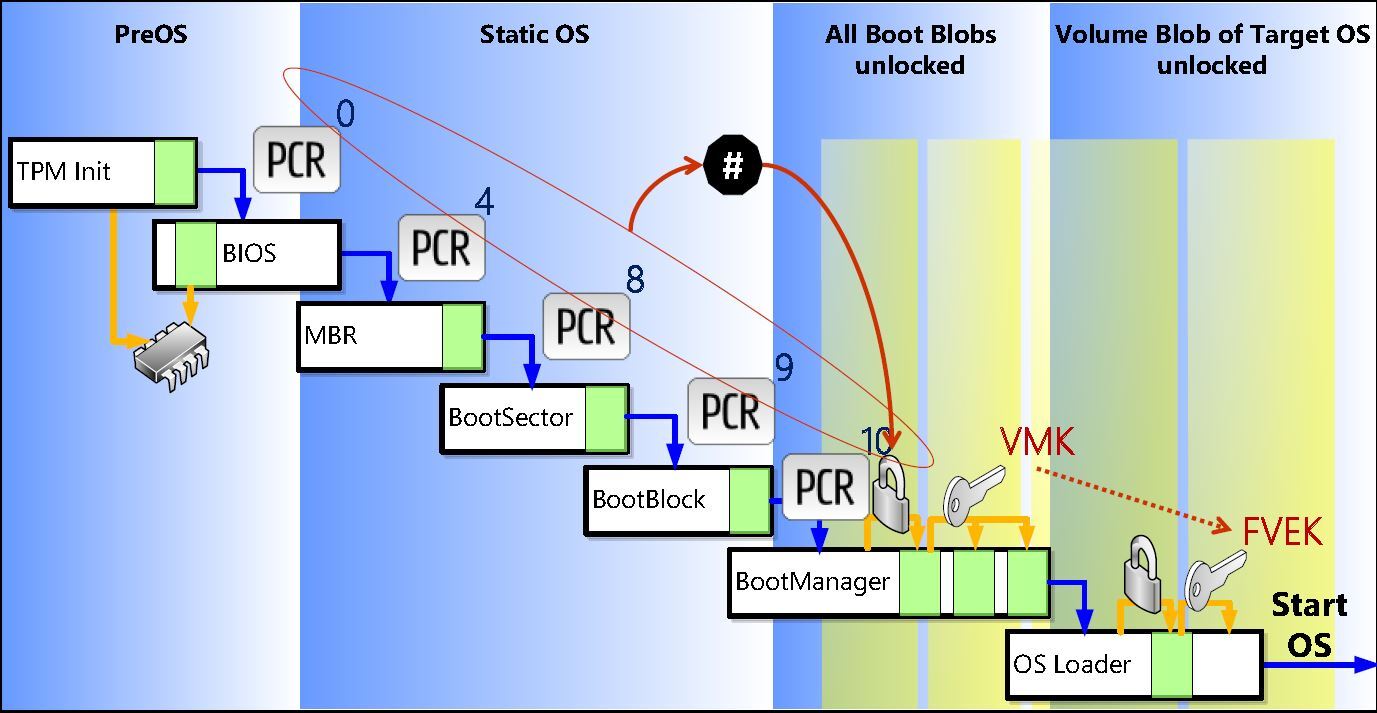
- PCR is Platform Configuration Register
- VMK is the Volume Master Key
- FVEK is the Full Volume Encryption Key
Disk Layout and Key Storage
- SRK is held in the TPM (which is a calculated value based on the validated PCRs)
- SRK encrypts the VMK (which is used for encrypting the FVEK)
- VMK encrypts the FVEK (which is used for encrypting data)
- FVEK and VMK are stored encrypted on the Operating System Volume
Key Protectors
Some key protectors include:
- TPM Only – vulnerable to hardware attacks, no impact for the user
- TPM plus PIN – vulnerable to hardware attacks, user must enter PIN at boot
- TPM plus USB – vulnerable to stolen USB key, user must protect the USB key
- TPM plus USB plus PIN – not vulnerable, user must protect the USB key and enter PIN at boot
- USB only – vulnerable to stolen key (no boot validation), user must protect USB key
There are many more including Certificate, Recovery Key, Recovery Password, Clear key, Password, etc.

Twan van Beers
Twan is a senior consultant with over 30 years of experience. He has a wide range of skills including Messaging, Active Directory, SQL, Networking and Firewalls. Twan loves to write scripts and get deep and dirty into debugging code, in order to understand and resolve the most complex of problems.
News & Insights
Trusted insights on technology and innovation to power your business growth.


-
 03/06/2026
A practical engineering guide to owners, assignment, consent, credentials and ...
Read More

-
19/05/2026
Domain migrations in Microsoft 365 are rarely as simple as shifting email ...
Read More

-
12/05/2026
Over the past 10 to 15 years, Microsoft 365 has fundamentally reshaped how ...
Read More

-
07/05/2026
Yesterday we had an all company meeting and I thought it would be cool to kick ...
Read More

-
07/05/2026
Planning a tenant-to-tenant migration? Talk to us
Read More

-
31/03/2026
In tenant-to-tenant (T2T) and Google-to-Microsoft 365 migration projects, ...
Read More

-
27/03/2026
You’d think this would be easy and not an uncommon request. There are genuine ...
Read More

-
23/03/2026
Managing Google to Microsoft Migration with GAM7 and PowerShell
Read More

-
16/03/2026
When a user leaves an organisation in Microsoft 365, administrators have ...
Read More
