



-
 Twan van Beers
-
 08 August, 2014
Today we are deviating away from the more Messaging related threads and we will be looking at authentication.
The reason for writing this article is that I am often asked to troubleshoot authentication issues and to my surprise there are not many simple explanations about how authentication works. Also I find time and again that people get confused about which Domain Controller is picked to do the authentication, or in a more complex scenario how authentication flows through a forest and across trust boundaries.
We will be looking more closely at NTLM in part 1, and then move onto Kerberos in part 2.
Before we begin let us deviate slightly by first talking about Active Directory sites and subnets. To start with I highly recommend reading the following TechNet article, How DNS Support for Active Directory Works. The article goes into great detail about which DNS records are registered, how automatic site coverage works, as well as the often confused Weight and Priority attributes of the DNS records. Some things that are often forgotten or ignored when it comes to AD and DNS
- Every AD site in a forest has DNS SRV records for every domain in the forest
- Clients that cannot determine their AD site will pretty much pick a Domain Controller at random
- Multiple forests require special attention if you want to control authentication between them
For a client to pick its nearest Domain Controller or Global Catalog it is crucial that the SRV records exist in the client AD Site’s DNS subdomains, such as _ldap._tcp. ._sites. . Note that the term client here is any machine looking for a Domain Controller or Global Catalog, it is not limited to workstations only.
Now let’s get into NTLM!
NTLM Authentication
NTLM authentication was developed in the 1990s and came from an older authentication method called Lan Manager. In its basic essence, NTLM is a challenge response authentication method.
This means that if my workstation wants to access a service on the server, then the server sends a challenge request back to the workstation and the workstation responds, the password is never transmitted over the network. If the server can validate this response, then the user is deemed to have been authenticated and it will move to check if the user is authorized to use the service. The key with NTLM is that the client already knows the information it needs to respond to a challenge request. It does not need to talk to a domain controller each time. However, the server that issued the challenge and gets the response does not have the relevant information in order to be able to validate the request, instead it needs to ask its domain controller to assist. It is this basic communication that confuses a number of people. The server will do the authentication by talking to a domain controller close to the server, NOT the client.
Of course in a single site, single domain, single forest network this is of no consequence whatsoever, but if we scale this out to multiple AD sites, multiple domains and perhaps even multiple forests and the picture gets more and more complicated. To help visualise the more complex scenario I have drawn up the following picture. Here there are two forests, a multi-domain user forest (contoso.com) and the single-domain resource forest (msg.contoso.com). We are using an Outlook client with an Exchange server (since that is what we know best) but the same applies for any client/server interaction.
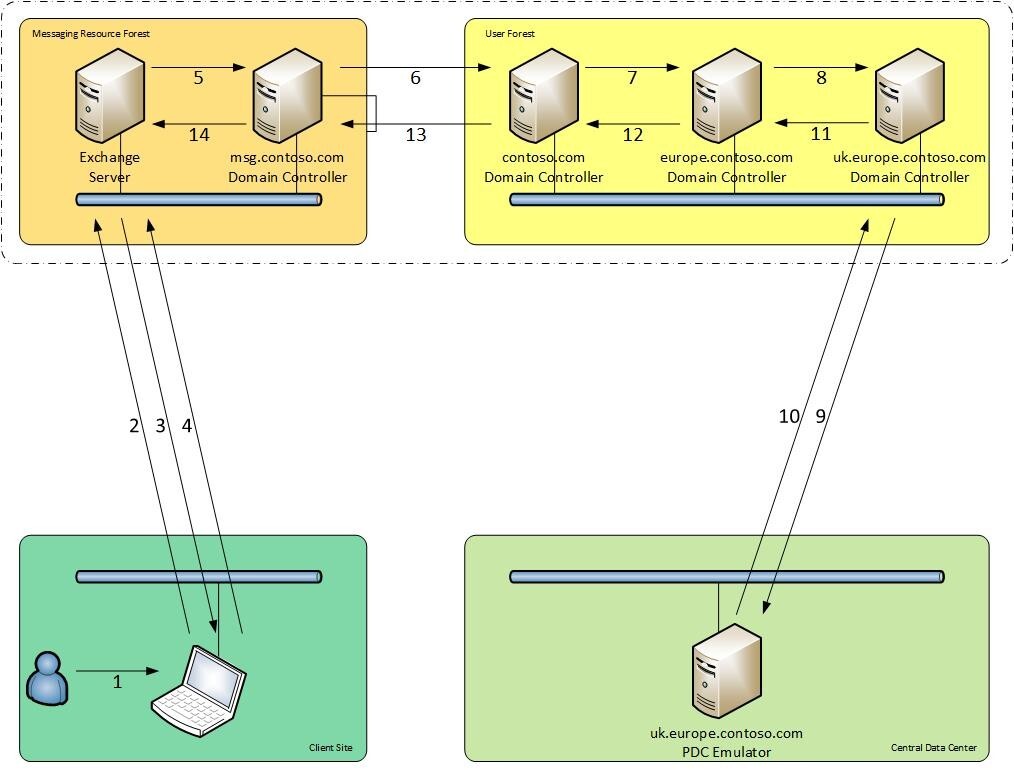
- A UK domain based user opens Outlook
- Outlook runs autodiscover and connects to the Exchange server
- The Exchange server responds and asks for authentication, typically Negotiate
- Outlook tries kerberos, fails (assuming Kerberos wasn’t explicitly enabled) and so uses NTLM and presents a response using the user’s hash
- The Exchange server passes the response to the MSG Domain Controller
- The MSG Domain Controller passes the response to a contoso.com Domain Controller
- The contoso.com Domain Controller passes the response to a EUROPE Domain Controller
- The EUROPE Domain Controller passes the response to a UK Domain Controller
- If the response fails to validate then the UK Domain Controller passes the response to the UK PDC Emulator
- The UK PDC Emulator passes the authentication result back
- The UK Domain Controller passes the authentication result back
- The EUROPE Domain Controller passes the authentication result back
- The contoso.com Domain Controller passes the authentication result back
- The MSG Domain Controller passes the authentication result back
The user is now either granted access or denied access, authorisation is performed on the Exchange server with consultation of the MSG Domain Controller.
As you can see there is quite a lot going on here and the Outlook client device really doesn’t talk to any domain controllers, instead the domain controllers pass information across the trust and then up and down the forest.
MaxConcurrentAPI
No discussion on NTLM is complete without mentioning MaxConcurrentAPI. This is the maximum number of outstanding NTLM requests that can exist at any one point in time without causing queueing. A request is outstanding from the time that a client submits a response until the server has sent that up and down the forest and sends an authentication response back to the client. The reason this is important is that once we start queueing requests we will inevitably get to authentication timeouts, which will often present themselves as sporadic authentication prompts.
For example Outlook may start to prompt when it tries to run its background autodiscover process, or when it starts up, yet when the user enters their credentials the prompt is generally accepted. To find out whether you are suffering from issues related to MaxConcurrentAPI I recommend reading the following article, , which not only describes how to find the issue retrospectively but also how to monitor for it with Performance Monitor and if desired to work out what to set MaxConcurrentAPI to. Often though it is recommended to just increase it to the maximum of 150 for a Domain Controller running on modern hardware.
There is a lot more to NTLM, in fact you could have an entire blog dedicated to authentication, but for us this is it for NTLM, next week we will cover Kerberos!

Twan van Beers
Twan is a senior consultant with over 30 years of experience. He has a wide range of skills including Messaging, Active Directory, SQL, Networking and Firewalls. Twan loves to write scripts and get deep and dirty into debugging code, in order to understand and resolve the most complex of problems.
News & Insights
Trusted insights on technology and innovation to power your business growth.


-
 03/06/2026
A practical engineering guide to owners, assignment, consent, credentials and ...
Read More

-
19/05/2026
Domain migrations in Microsoft 365 are rarely as simple as shifting email ...
Read More

-
12/05/2026
Over the past 10 to 15 years, Microsoft 365 has fundamentally reshaped how ...
Read More

-
07/05/2026
Yesterday we had an all company meeting and I thought it would be cool to kick ...
Read More

-
07/05/2026
Planning a tenant-to-tenant migration? Talk to us
Read More

-
31/03/2026
In tenant-to-tenant (T2T) and Google-to-Microsoft 365 migration projects, ...
Read More

-
27/03/2026
You’d think this would be easy and not an uncommon request. There are genuine ...
Read More

-
23/03/2026
Managing Google to Microsoft Migration with GAM7 and PowerShell
Read More

-
16/03/2026
When a user leaves an organisation in Microsoft 365, administrators have ...
Read More
