



-
 Twan van Beers
-
 16 January, 2018
DirectAccess has come a long way and with Windows Server 2016 it is pretty easy to install as a single site, single server deployment. What if you need additional resilience though, what if you want a fail over server? You can of course go down the multi-site route but that needs IPv6 to be deployed within and between the data centers, which is not exactly straight forward… Alternatively you can use Windows Network Load Balancing or a Hardware Load Balancer to do this within a site, but then what if the connectivity to that site failed?
A simple, cheap alternative DirectAccess failover
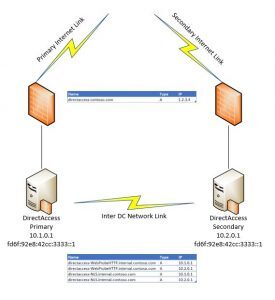
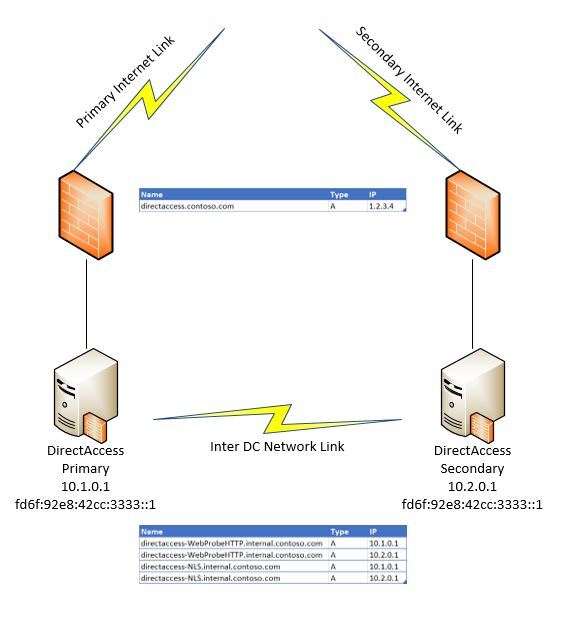
I’ve deployed two DirectAccess servers within a single forest, where the two servers are in separate data centers. Using DNS and Firewall NATs we can fail over between the two with no other configuration changes needed. So what’s the catch? It isn’t documented anywhere that I can see, and it uses a form of AnyCast configuration where the same subnet exists in two places on the network at the same time. Aside from that I’ve not come across any other catch.
So how to set it up…
You need two Windows Server 2016 servers with a single NIC each and DirectAccess installed but not configured. The key is ensuring that the NIC has the same static IP configured on both of the servers. I ran the config once to see which IP it gave and then backed it out and set the IP before running the config again. In my case it was fd6f:92e8:42cc:3333::1/128. So running through the config I ensured that:
- I used the same Security Group to nominate the computers that are in scope for getting DirectAccess enabled
- I turned off the option ‘Enable DirectAccess for Mobile Computers Only’ as it is a performance drain and unecessary
- I used the default Network Connectivity Assistant and Probe address (and ensured that they were the same on both servers)
- I used the same public DNS name for DirectAccess on both servers and used the same public certificate for both
- I kept Network Location Service on both of the DirectAccess servers, and used the default name
- I set the IPv6 prefix to fd6f:92e8:42cc:/48
- I set the IPv6 prefix assigned to client computers to fd6f:92e8:42cc:1000::/64
- I used different server and client GPOs for both DirectAccess server installations (and then ensured that the server GPO was only bound to the respective DirectAccess server and that BOTH of the client GPOs were bound to all relevant DirectAccess client workstations
- I registered the private IPv4 address of both DirectAccess servers for the probe and NLS DNS names, and also registered the primary public IP address for the main DirectAccess DNS name
- I chose to only support Windows 10 clients and only IP-HTTPS (the principal should work with IPsec or Teredo though but not something I’ve tried)
I did further lock down the DirectAccess and Workstations in order to conform to the GPO baselines set out by the Center of Internet Security (CIS) and to fully manage the Windows firewalls for inbound communications on both sides.
Once that was done then simply changing the firewall NAT allows me to failover between one server and the other. In the event of a total site outage at the primary data center, then updating the DirectAccess DNS name with the failover public IP that routes to the secondary data center also allows that to be survived.
All in all it turned out to be easier than I thought and has been very robust. Hopefully this helps some of you who do want an additional level of resilience but don’t want to deploy IPv6.
Enjoy!

Twan van Beers
Twan is a senior consultant with over 30 years of experience. He has a wide range of skills including Messaging, Active Directory, SQL, Networking and Firewalls. Twan loves to write scripts and get deep and dirty into debugging code, in order to understand and resolve the most complex of problems.
News & Insights
Trusted insights on technology and innovation to power your business growth.


-
 03/06/2026
A practical engineering guide to owners, assignment, consent, credentials and ...
Read More

-
19/05/2026
Domain migrations in Microsoft 365 are rarely as simple as shifting email ...
Read More

-
12/05/2026
Over the past 10 to 15 years, Microsoft 365 has fundamentally reshaped how ...
Read More

-
07/05/2026
Yesterday we had an all company meeting and I thought it would be cool to kick ...
Read More

-
07/05/2026
Planning a tenant-to-tenant migration? Talk to us
Read More

-
31/03/2026
In tenant-to-tenant (T2T) and Google-to-Microsoft 365 migration projects, ...
Read More

-
27/03/2026
You’d think this would be easy and not an uncommon request. There are genuine ...
Read More

-
23/03/2026
Managing Google to Microsoft Migration with GAM7 and PowerShell
Read More

-
16/03/2026
When a user leaves an organisation in Microsoft 365, administrators have ...
Read More
