Recommendations for new customers moving to Microsoft Outlook from IBM Lotus Notes.
Despite the presence of 3rd Party Coexistence solutions such as Binary Tree Coexistence Manager for Notes the rescheduling of repeating meetings is still not able to be resolved in certain scenarios. Specifically: “this and all future instances”, and to a lesser importance “this and all previous instances”, simple do not work and cannot be made to work ever due to the variations of Domino and Exchange. Yes, the Chairperson/Sender receives a graceful delivery failure message, but if the Chairperson/Sender does not act upon this, or worse still does not read or even understand the message, then you will have a worrying disconnect of participants’ attendance.
This Coexistence experience however can be further mitigated by deploying some simple policy documents, where your environment is suitable, in conjunction with Binary Tree CMT for Coexistence.
It is highly desirable to implement these IBM features:
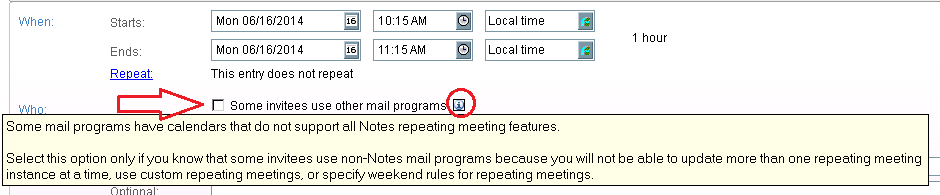
Users should be encouraged to use this option:
If you require Outlook/Exchange interoperability but do not want to require end users to have to select the “Some invitees use other mail clients” option, do one of the following:
Read more here: http://www.ibm.com/developerworks/lotus/library/notes85-icalendar/
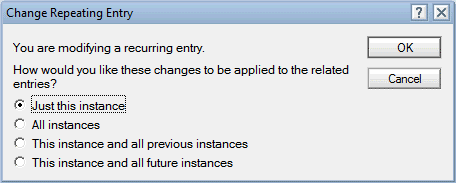
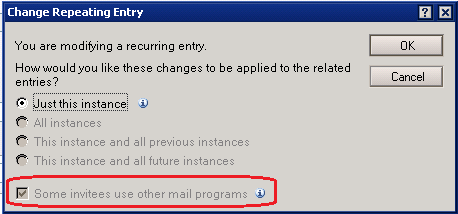
Implementing this feature would make a world of difference to remove the following bottom two options in this re-schedule dialogue.
BEFORE:
AFTER:
Now, we also have some really clever (and demanding 🙂 ) customers that have asked for some advance logic as they are in very long term Coexistence, 2+ years, and asked us to help design a solution where the Notes Mail Template used intelligent look-ups to establish whether the Participant List contained Migrated users in Office 365 / Exchange. This required some additional custom subforms and coding that we will not go into here.
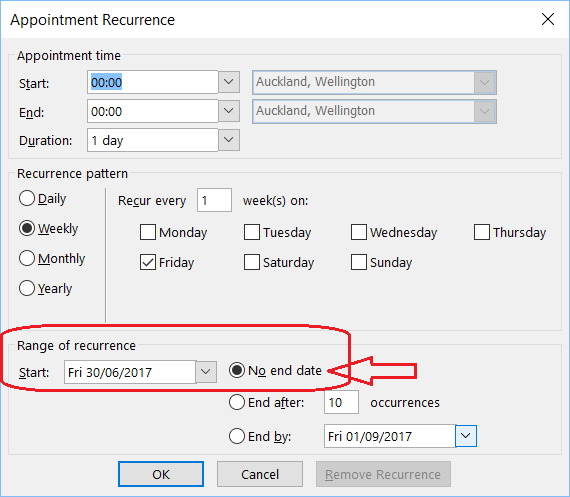
Disable Repeating Meetings with “no end date”. Have you noticed this is the default in Outlook?
IBM Domino Server does not know what to do with an Outlook Meeting with no end date, so Binary Tree Coexistence rightly blocks this, and sends a notification back to the Chairperson in Outlook. The recipient correctly never receives that particular invite. However, this does require the Chairperson to then cancel that meeting, and re-create it correctly. This is a bit annoying on a regular basis, and may not happen if they ignore that notification, or a delegate set-it up, or for some other reason the notification does not get received. Solution, do not allow repeating meetings with no end dates in the first place/
How to control Outlook recurrence patterns using group policy: http://support.microsoft.com/kb/2548319
The Outlook Calendar fully integrates with email, contacts, and other features. This integration makes the Calendar component one of the most popular features of Outlook. In this article, we will guide you through the use of the Calendars various functions. In addition, we’ll introduce you to calendar improvements that are specifically targeted to make your experience more consistent.
Depending on how Binary Tree ZApp is configured, you may either receive an encapsulated NSF file, or a NOTES:/// hyperlink directed users back to a Common Store Database containing their email item that could not be opened in Outlook. If you opt for the latter, then Disable Warning Message in Outlook When launching Notes Links (aka DisableHyperlinkWarning) is the way for you.
(If the Security key/folder already exists under the Common key, then select it. If it doesn’t exist already then create it via; Edit-> New-> Key)
Here create a new DWORD Value via; Edit-> New-> DWORD Value
If your user and Workstation is in a corporate Domain using Group Policy to Control MS Office you will need:
HKEY_USERS\”User Account SID”
You’ll probably need to create the REG_DWORD called “DisableHyperLinkWarning”. It will should a value of 1
NOTE:
This fix will also apply across all of Office Word, Excel, Power Point, Outlook and Access. If the content is disabled, like macros or blocked file extensions, they will still be blocked.